> For the complete documentation index, see [llms.txt](https://www.boxhero.io/docs/llms.txt). Markdown versions of documentation pages are available by appending `.md` to page URLs; this page is available as [Markdown](https://www.boxhero.io/docs/documentation/hi/other-features/low-stock-alert.md).
# कम स्टॉक अलर्ट
BoxHero की Low Stock Alerts सुविधा आपको तब सूचित करती है जब किसी आइटम की उपलब्ध मात्रा आपके सेट किए गए सुरक्षा स्टॉक स्तर से कम या बराबर हो जाती है, जिससे आपके पास स्टॉक समाप्त होने से पहले पुनः ऑर्डर करने का समय मिल जाता है।
लो स्टॉक अलर्ट सूचनाएँ सीधे के माध्यम से प्राप्त करें मोबाइल ऐप.
***
## लो स्टॉक अलर्ट कैसे प्राप्त करें
{% stepper %}
{% step %}
### सेफ्टी स्टॉक स्तर सेट करें
BoxHero में, "सेफ्टी स्टॉक" किसी आइटम की वह न्यूनतम मात्रा है जिसे आप स्टॉक खत्म होने से बचाने के लिए उपलब्ध रखना चाहते हैं। अपनी इन्वेंटरी स्तरों की निगरानी शुरू करने के लिए इसे सेट करें।
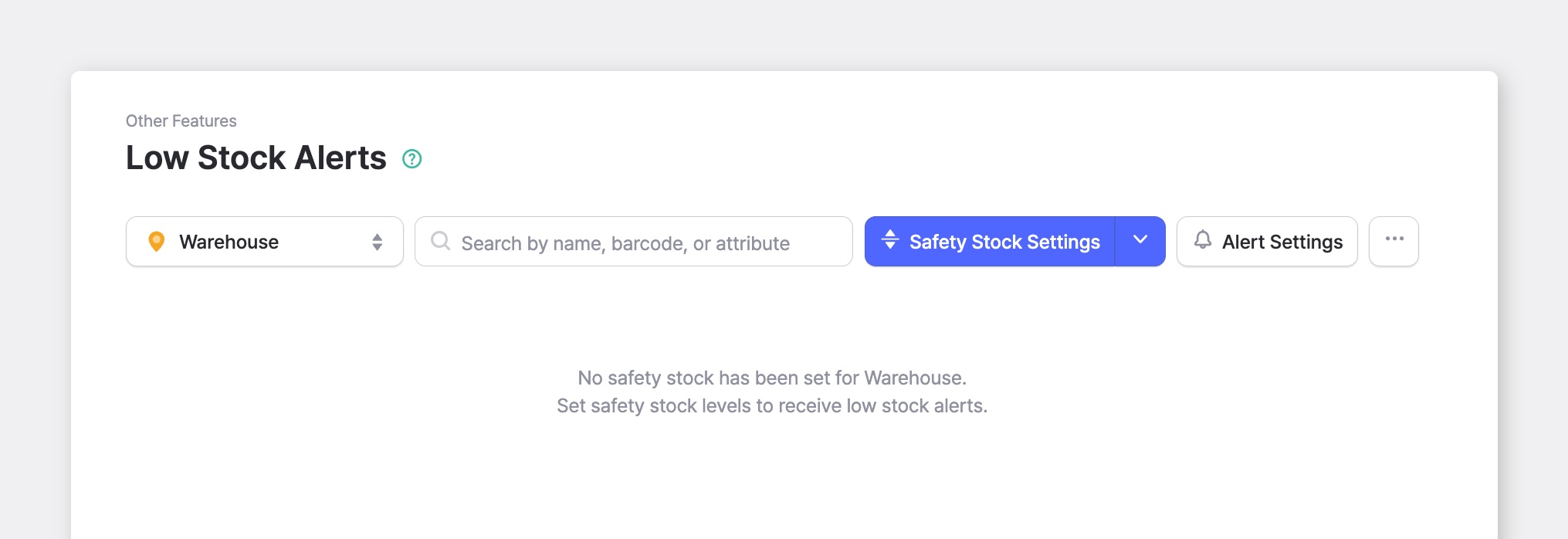
* पर जाएँ `अन्य सुविधाएँ` > `लो स्टॉक अलर्ट`.
* ड्रॉपडाउन से एक स्थान चुनें:
* **सभी लोकेशन**: सभी साइटों की इन्वेंटरी का योग करता है
* **विशिष्ट स्थान**: एक ही साइट के स्तरों को ट्रैक करता है (जैसे: वेयरहाउस, मुख्य कार्यालय)
* क्लिक करें `सेफ्टी स्टॉक सेटिंग्स`.
* में प्रत्येक आइटम के लिए सेफ्टी स्टॉक स्तर दर्ज करें `सेफ्टी स्टॉक` कॉलम में, फिर क्लिक करें `सहेजें`.
* एक साथ कई आइटमों के लिए सेफ्टी स्टॉक सेट करने हेतु उपयोग करें `Excel से आयात करें` के बगल में मौजूद ड्रॉपडाउन से `सेफ्टी स्टॉक सेटिंग्स`.
* अपना वर्तमान स्तर डाउनलोड करने के लिए, क्लिक करें `...` (अधिक)> `एक्सेल में निर्यात करें`.
{% hint style="success" %}
किसी आइटम के सेफ्टी स्टॉक को सेट करें **0** सूचित किए जाने के लिए *केवल* जब वह स्टॉक से बाहर हो जाए।
{% endhint %}
{% endstep %}
{% step %}
### अलर्ट सेटिंग्स प्रबंधित करें
निर्धारित करें कि अलर्ट किसे मिलने चाहिए, और प्रत्येक व्यक्ति को कैसे सूचित किया जाए।
* क्लिक करें `अलर्ट सेटिंग्स`.
* सूचित किए जाने वाले टीम सदस्यों को जोड़ने के लिए सर्च बार का उपयोग करें।
* प्रत्येक प्राप्तकर्ता के लिए, अलर्ट का समय और डिलीवरी विधि सेट करें: `पुश`, `ईमेल`, या दोनों।
* क्लिक करें `सहेजें`.
{% hint style="warning" %}
**नोट**: पुश सूचनाएँ के माध्यम से भेजी जाती हैं [मोबाइल ऐप](/docs/documentation/hi/getting-started.md#get-the-mobile-app), इसलिए प्राप्तकर्ताओं के पास यह इंस्टॉल होना चाहिए। यदि किसी को पुश अलर्ट नहीं मिल रहे हैं, तो उनके फ़ोन की सेटिंग्स में जाँच करें कि BoxHero के लिए सूचनाएँ सक्षम हैं।
{% endhint %}
{% endstep %}
{% step %}
### लो स्टॉक आइटमों की निगरानी करें
वापस `लो स्टॉक अलर्ट` स्क्रीन पर, जिन आइटमों पर ध्यान देना है उन्हें स्थिति के अनुसार समूहित किया जाता है, ताकि आप एक नज़र में देख सकें कि क्या तात्कालिक है।
* **लो स्टॉक** — उपलब्ध मात्रा सेफ्टी स्टॉक स्तर के बराबर या उससे कम है।
* **कम हो रहा है** — उपलब्ध मात्रा सेफ्टी स्टॉक स्तर के करीब है।
* **अधिक स्टॉक** — उपलब्ध मात्रा सेफ्टी स्टॉक स्तर से काफी ऊपर है।
प्रत्येक आइटम में निम्नलिखित दिखता है:
* **सेफ्टी स्टॉक** — वह न्यूनतम मात्रा जिसे आप उपलब्ध रखना चाहते हैं।
* **उपलब्ध** — वह मात्रा जो वर्तमान में आपके पास स्टॉक में है।
* **कमी** या **बफ़र** — आप अपने सेफ्टी स्टॉक स्तर से कितने नीचे या ऊपर हैं।
{% hint style="success" %}
चुनें `ⓘ` किसी समूह नाम के पास वाला आइकन, यह देखने के लिए कि वह स्थिति कैसे गणना की जाती है।
{% endhint %}
{% endstep %}
{% endstepper %}
***
## मोबाइल पर
**लो स्टॉक अलर्ट** मोबाइल ऐप में भी इसी तरह काम करता है, बस कुछ अंतर हैं।
{% embed url="" %}
### सेफ्टी स्टॉक सेट करें
1. टैप करें `+ सेफ्टी स्टॉक सेट करें`.
2. किसी आइटम पर टैप करें और कीपैड पर उसका स्तर दर्ज करें।
3. टैप करें `लागू करें`.
किसी आइटम को बारकोड से खोजने के लिए आप सर्च बार में स्कैन आइकन पर भी टैप कर सकते हैं।
### अलर्ट सेटिंग्स प्रबंधित करें
1. टैप करें `⚙️` (सेटिंग्स)।
2. टैप करें `+प्राप्तकर्ता जोड़ें` यह चुनने के लिए कि किसे सूचित किया जाए।
3. किसी प्राप्तकर्ता को खोलें ताकि उनके `अलर्ट समय` और `डिलीवरी विधियाँ`.
***
## अक्सर पूछे जाने वाले प्रश्न
**लो स्टॉक अलर्ट के बारे में कोई प्रश्न हैं?** हमारा FAQ देखें।
{% content-ref url="/spaces/jeKT9TXNa7rmvXs5IP9U/pages/68c999bc0812d940f7319aedb0d992427988f0f6" %}
[कम स्टॉक अलर्ट](/docs/faq/hi/inventory-and-transactions/low-stock-alerts.md)
{% endcontent-ref %}
.png?alt=media)