# 売上レポート

<figure><img src="/files/2cf00fc402e2b4a8618b04d5a3a9e48c1d9fd3c0" alt=""><figcaption></figcaption></figure>

***

## 主なハイライト

* **指標を追跡する** 平均販売価格、販売数量、純利益、利益率など。
* 売上データと仕入データを比較して **傾向と機会を把握する**.
* **データを活用して** 不振商品を特定し、必要に応じて価格を調整します。

{% hint style="warning" %}
売上レポート *のみ* ～で記録された取引のみを含みます。 **仕入・売上** メニュー。次のような通常の在庫操作で行われた取引は **入庫** または **在庫** **切れ** *含まれません。* 含まれません。
{% endhint %}

## 売上レポートのタブ

BoxHero は売上データを 2 つの異なるタブで整理します。

### A. 利益分析

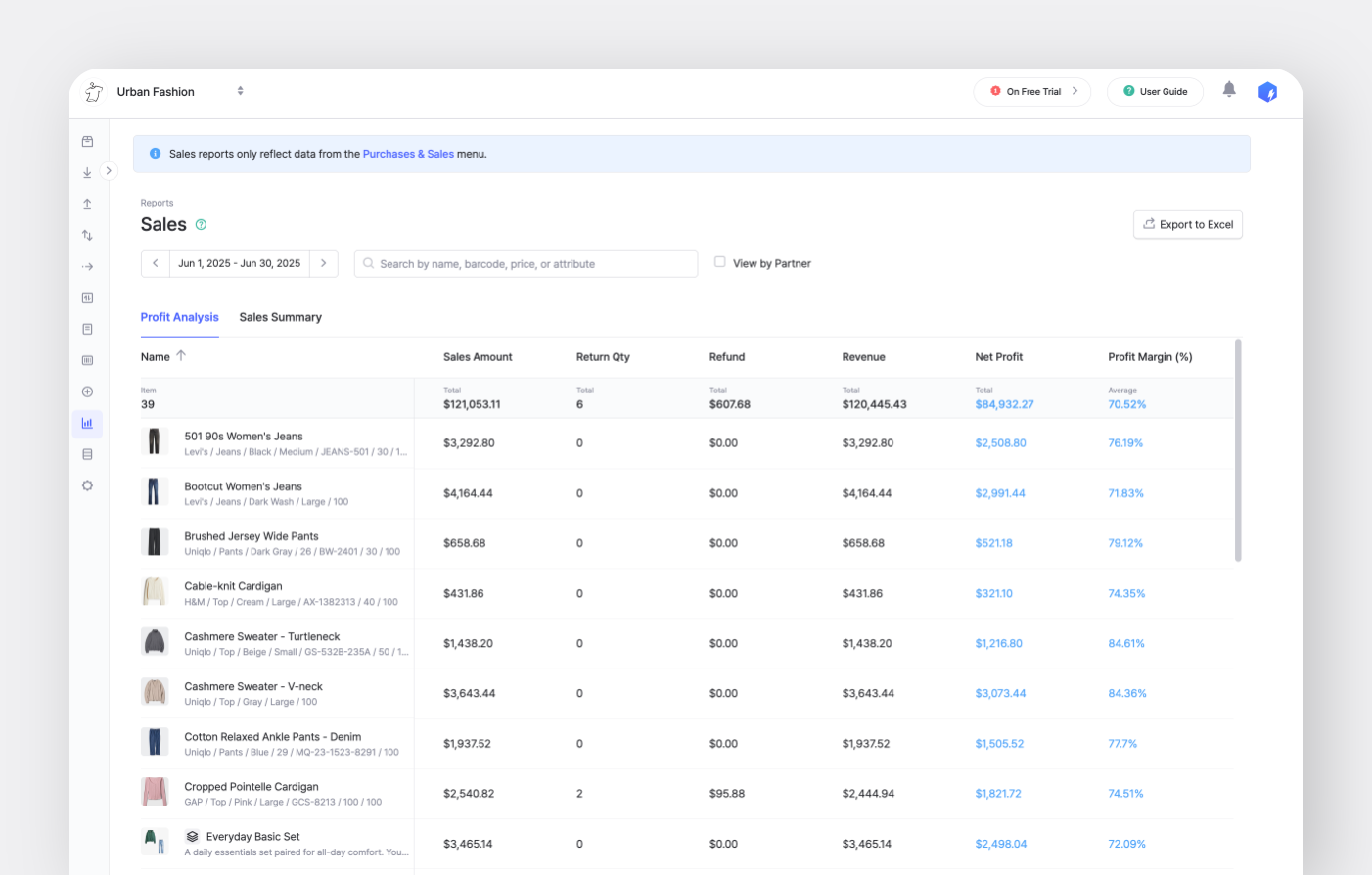
チームの利益は、完了済みの受注記録に基づいて計算されます。もし <mark style="color:青;">`売上`</mark> 機能のみを使用し、 <mark style="color:青;">`仕入`</mark>を記録していなくても、このタブで利益結果を確認できます。

<figure><img src="/files/0f0ee7fded95c752cf829d025738c0f85cff0adf" alt=""><figcaption></figcaption></figure>

次の主要指標で、チームの収益性を把握しましょう。

<table><thead><tr><th width="275"></th><th></th></tr></thead><tbody><tr><td><strong>平均販売価格</strong></td><td>売上金額 ÷ 販売数量</td></tr><tr><td><strong>販売数量</strong></td><td>販売された商品の合計数。</td></tr><tr><td><strong>売上金額</strong></td><td>販売数量 × 販売価格<br><sub><em>* 販売価格は受注書に記載された価格です。</em></sub></td></tr><tr><td><strong>返品数量</strong></td><td>返品され、在庫に戻された商品の数。</td></tr><tr><td><strong>返品金額</strong></td><td>返品数量 × 返金価格<br><sub><em>* 返金価格は返品注文に記載された価格です。</em></sub></td></tr><tr><td><strong>売上高</strong></td><td>売上金額 − 返金金額</td></tr><tr><td><strong>純利益</strong></td><td><p>売上高 −（原価 ×（販売数量 − 返品数量））</p><p><sub><em>* 原価は商品詳細に記載された仕入価格です。</em></sub></p></td></tr><tr><td><strong>利益率（%）</strong></td><td>純利益 ÷ 売上高</td></tr></tbody></table>

{% hint style="warning" %}
**利益分析の指標に関する注意事項：**

* **売上金額** には *割引* と *税金*.
* を含みます。商品の原価を更新すると、 **純利益** は更新後の仕入価格に基づいて再計算されます。
* 選択した期間中に売上があった商品のみが **選択した期間** に表示されます。
* **返品数量** は、返品処理が行われた日付に基づいて利益計算に反映されます。
  {% endhint %}

### B. 売上サマリー

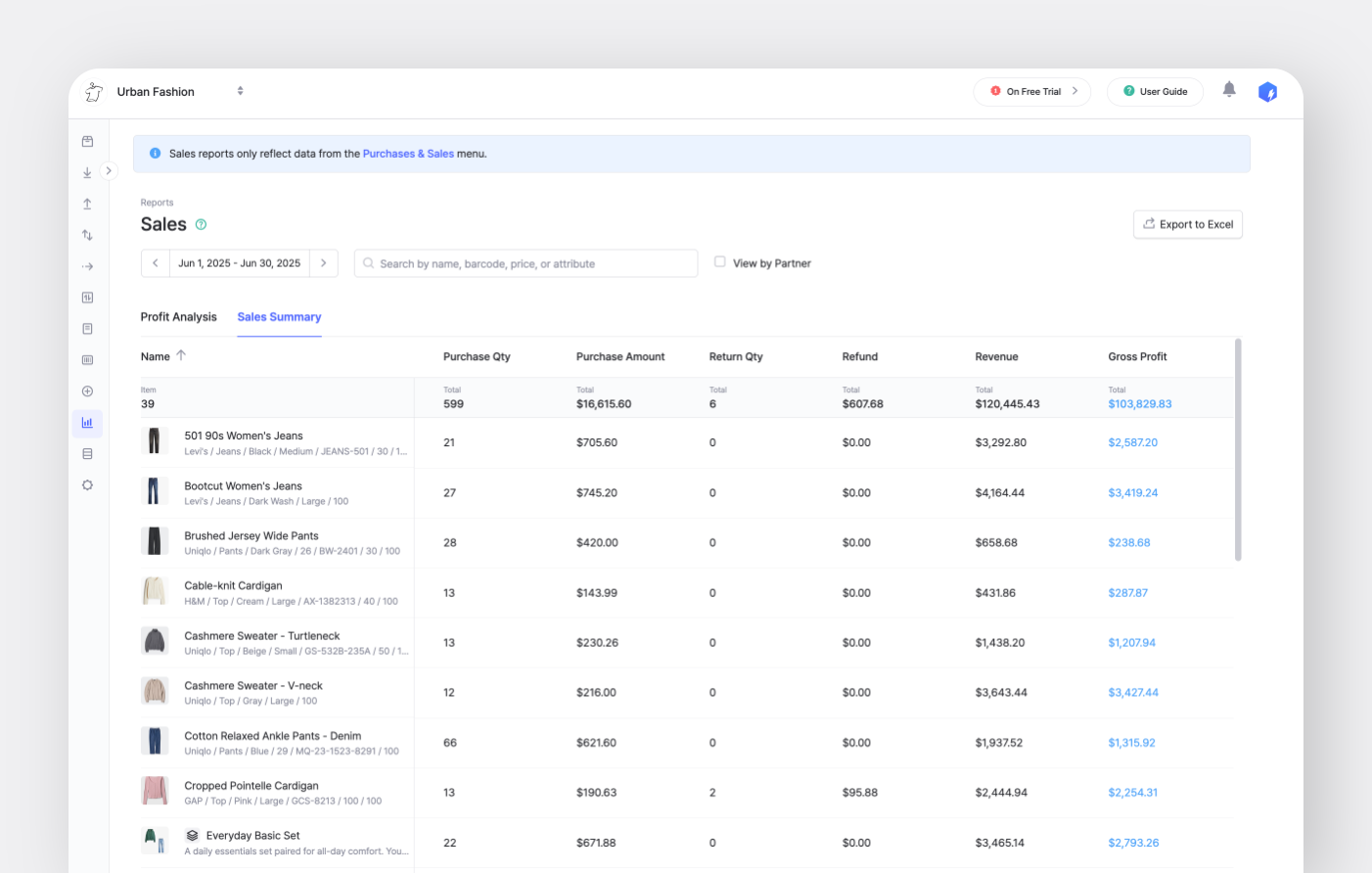
売上サマリーデータは、 *完了済み* の発注書（PO）と受注書（SO）に基づいて計算されます。両方の <mark style="color:青;">`仕入`</mark> と <mark style="color:青;">`売上`</mark> 機能を使用している場合、このタブで結果を確認できます。

<figure><img src="/files/46da28a8a0635b2b617e18eaffddabc4ef8af77f" alt=""><figcaption></figcaption></figure>

次の指標で、仕入と売上のパフォーマンスを評価しましょう。

<table><thead><tr><th width="275"></th><th></th></tr></thead><tbody><tr><td><strong>販売数量</strong></td><td>販売された商品の合計数。</td></tr><tr><td><strong>売上金額</strong></td><td>販売数量 × 販売価格<br><sub><em>* 販売価格は受注書に記載された価格です。</em></sub></td></tr><tr><td><strong>仕入数量</strong></td><td>仕入れた商品の合計数。</td></tr><tr><td><strong>仕入金額</strong></td><td>仕入数量 × 原価<br><sub><em>* 原価は発注書に記載された価格です。</em></sub></td></tr><tr><td><strong>返品数量</strong></td><td>返品され、在庫に戻された商品の数。</td></tr><tr><td><strong>返金金額</strong></td><td>返品数量 × 返金価格<br><sub><em>* 返金価格は返品注文に記載された価格です。</em></sub></td></tr><tr><td><strong>売上高</strong></td><td>売上金額 − 返金金額</td></tr><tr><td><strong>売上総利益</strong></td><td>売上高 − 仕入金額</td></tr></tbody></table>

{% hint style="success" %}
選択 <mark style="color:青;">`取引先別で表示`</mark> して、特定の **顧客** **と** **仕入先** の売上を、選択した期間で確認します。
{% endhint %}


---

# Agent Instructions: Querying This Documentation

If you need additional information that is not directly available in this page, you can query the documentation dynamically by asking a question.

Perform an HTTP GET request on the current page URL with the `ask` query parameter:

```
GET https://www.boxhero.io/docs/documentation/ja/na/purchase-and-sales/sales-reports.md?ask=<question>
```

The question should be specific, self-contained, and written in natural language.
The response will contain a direct answer to the question and relevant excerpts and sources from the documentation.

Use this mechanism when the answer is not explicitly present in the current page, you need clarification or additional context, or you want to retrieve related documentation sections.