# 재고 부족 알림

***

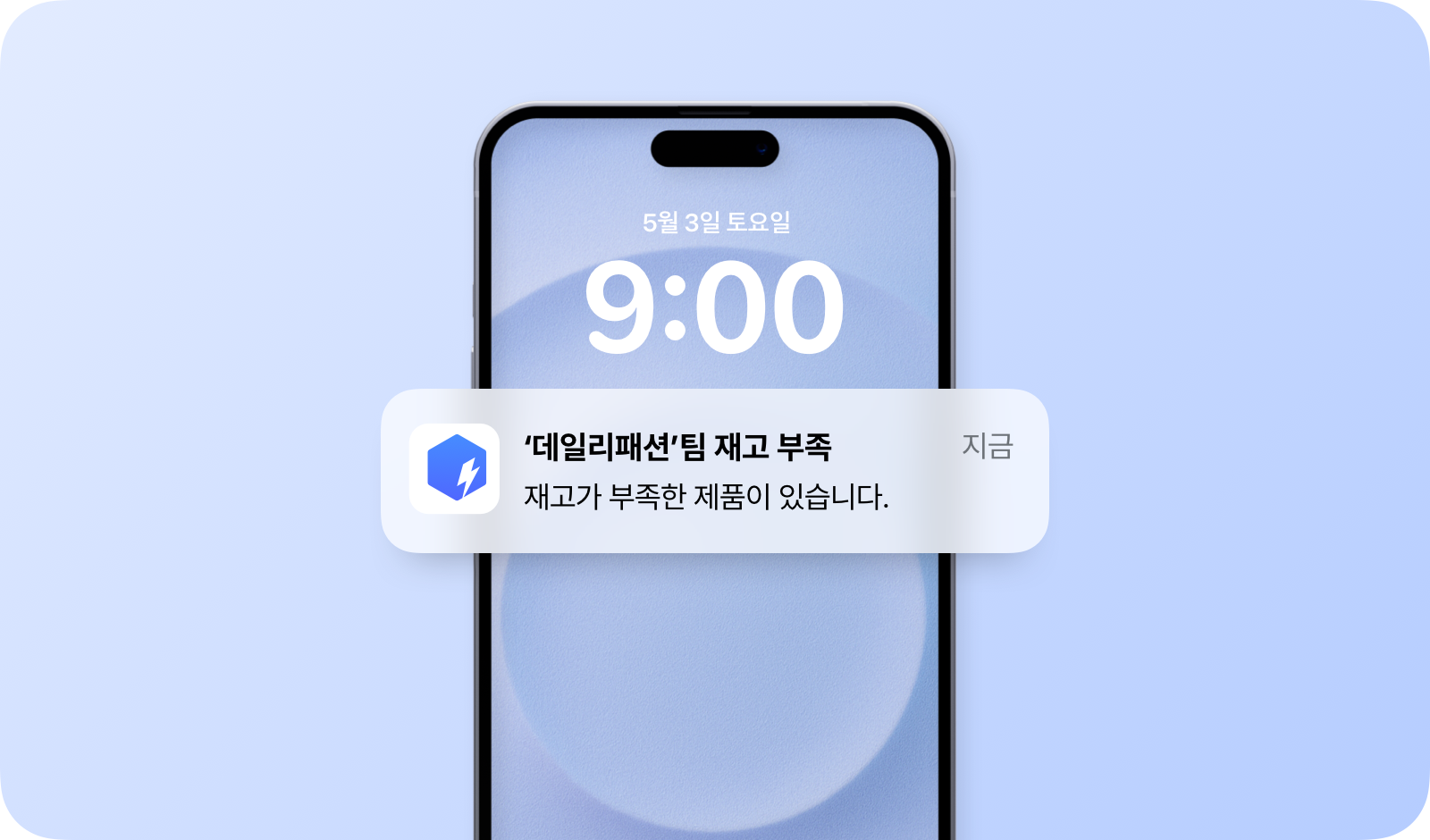
<figure><img src="https://3639913499-files.gitbook.io/~/files/v0/b/gitbook-x-prod.appspot.com/o/spaces%2FnmQcxJVYbkAeUq7yQCkF%2Fuploads%2Fgit-blob-1bb5ba93c9cc3925bb4429771eab9f1173bb3ff2%2F%E1%84%8C%E1%85%A2%E1%84%80%E1%85%A9%20%E1%84%87%E1%85%AE%E1%84%8C%E1%85%A9%E1%86%A8%20%E1%84%8B%E1%85%A1%E1%86%AF%E1%84%85%E1%85%B5%E1%86%B7.png?alt=media" alt=""><figcaption></figcaption></figure>

***

## 안전 재고 설정 <a href="#how-to-set-up" id="how-to-set-up"></a>

{% stepper %}
{% step %}
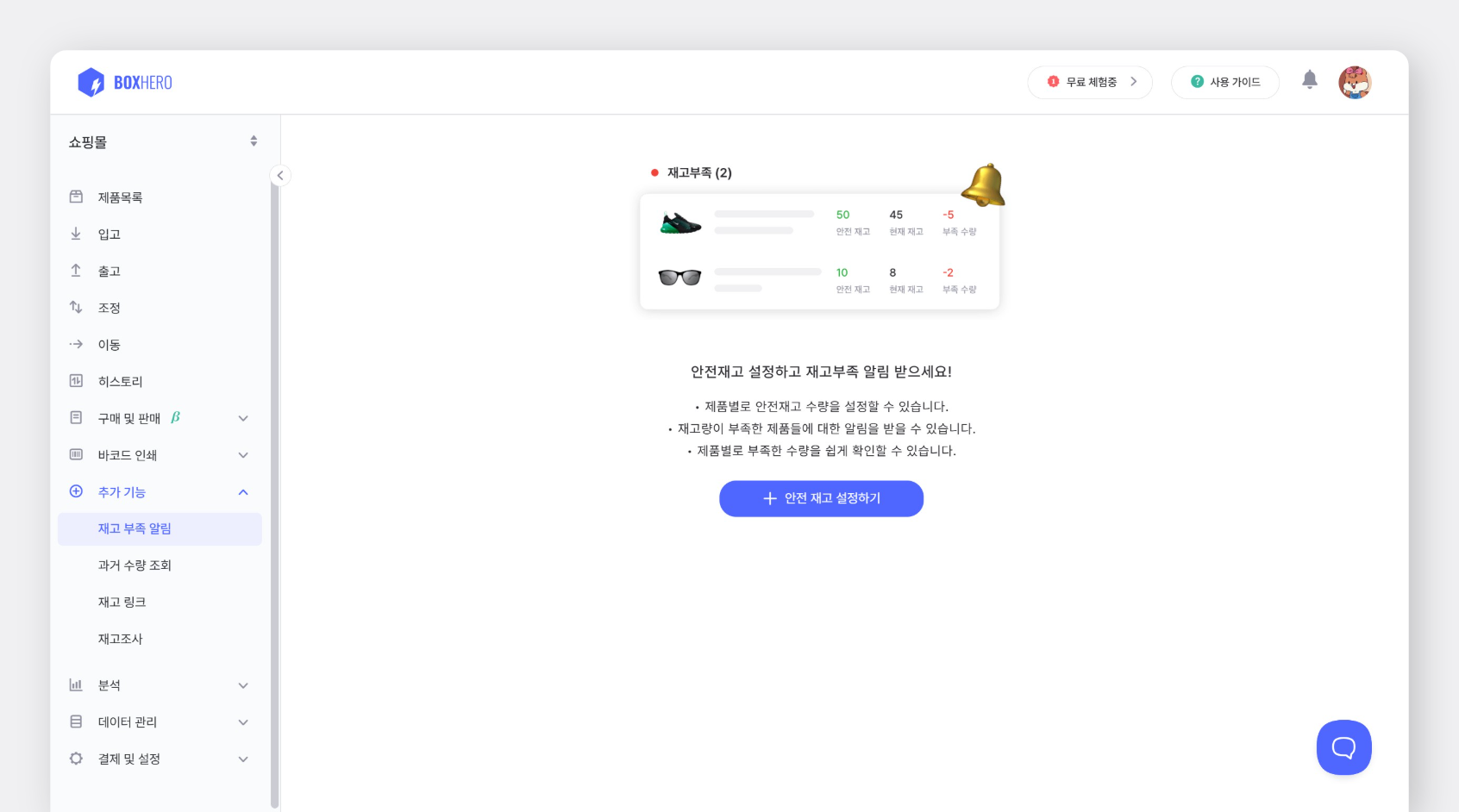
`추가 기능` > `재고 부족 알림` > `안전 재고 설정하기` 버튼을 눌러주세요.

<figure><img src="https://3639913499-files.gitbook.io/~/files/v0/b/gitbook-x-prod.appspot.com/o/spaces%2FnmQcxJVYbkAeUq7yQCkF%2Fuploads%2Fgit-blob-15019a94c289d227fc76dab56ed6b5f9bf33c6f9%2Ffilename%20-%202025-04-07T155600.608.png?alt=media" alt="안전재고 설정 화면"><figcaption></figcaption></figure>
{% endstep %}

{% step %}
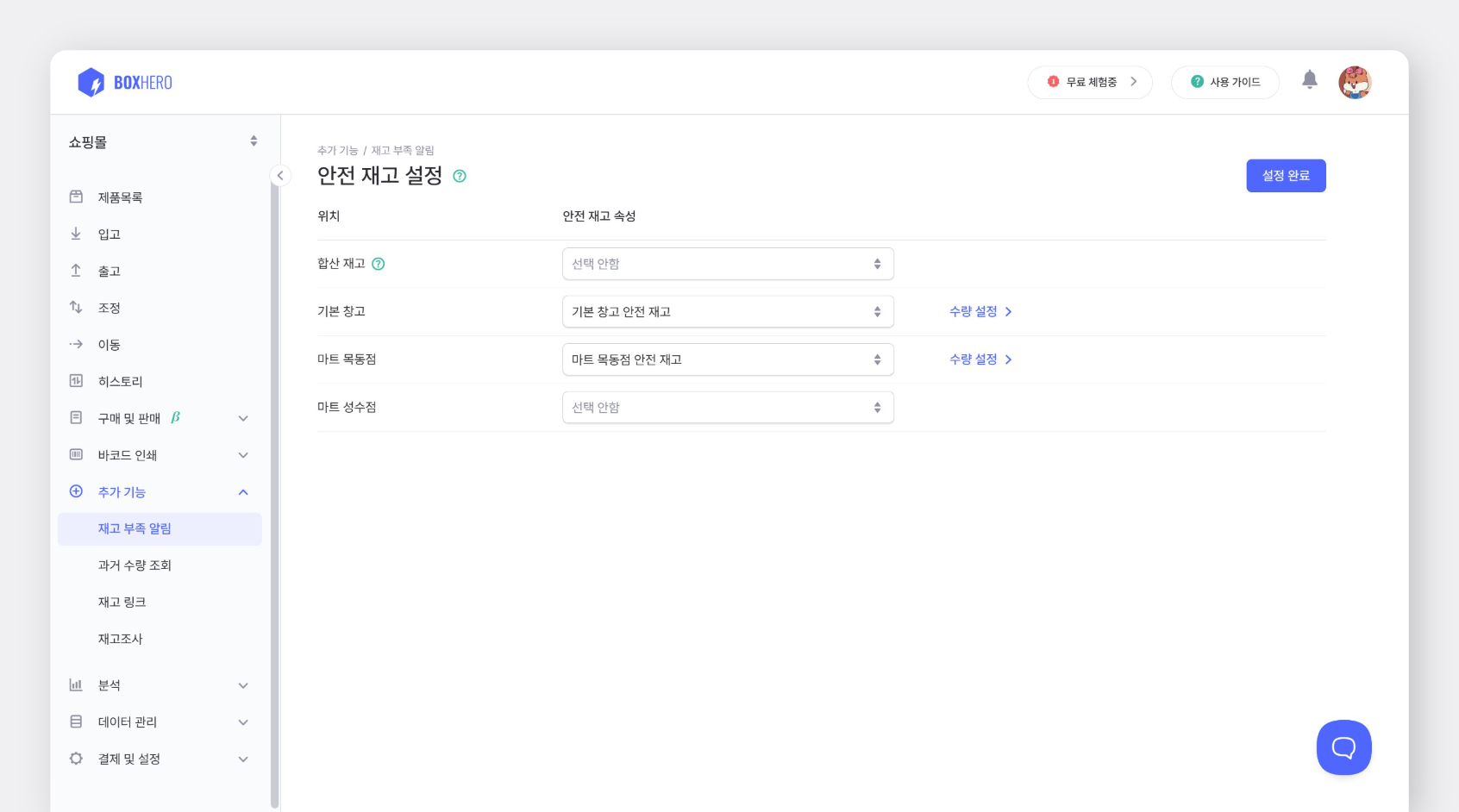
`합산 재고` 우측 드롭다운 메뉴에서 `+추가하기`를 선택해 안전 재고 속성을 등록합니다.

{% embed url="<https://customer-0jrbilsa8yt3k758.cloudflarestream.com/78cbbbd2a38c4ae9b9172f61de5f95d0/iframe?autoplay=true&controls=false&letterboxColor=transparent&loop=true&muted=true&poster=https://customer-0jrbilsa8yt3k758.cloudflarestream.com/78cbbbd2a38c4ae9b9172f61de5f95d0/thumbnails/thumbnail.jpg?height=1080&preload=true>" %}
{% endstep %}

{% step %}
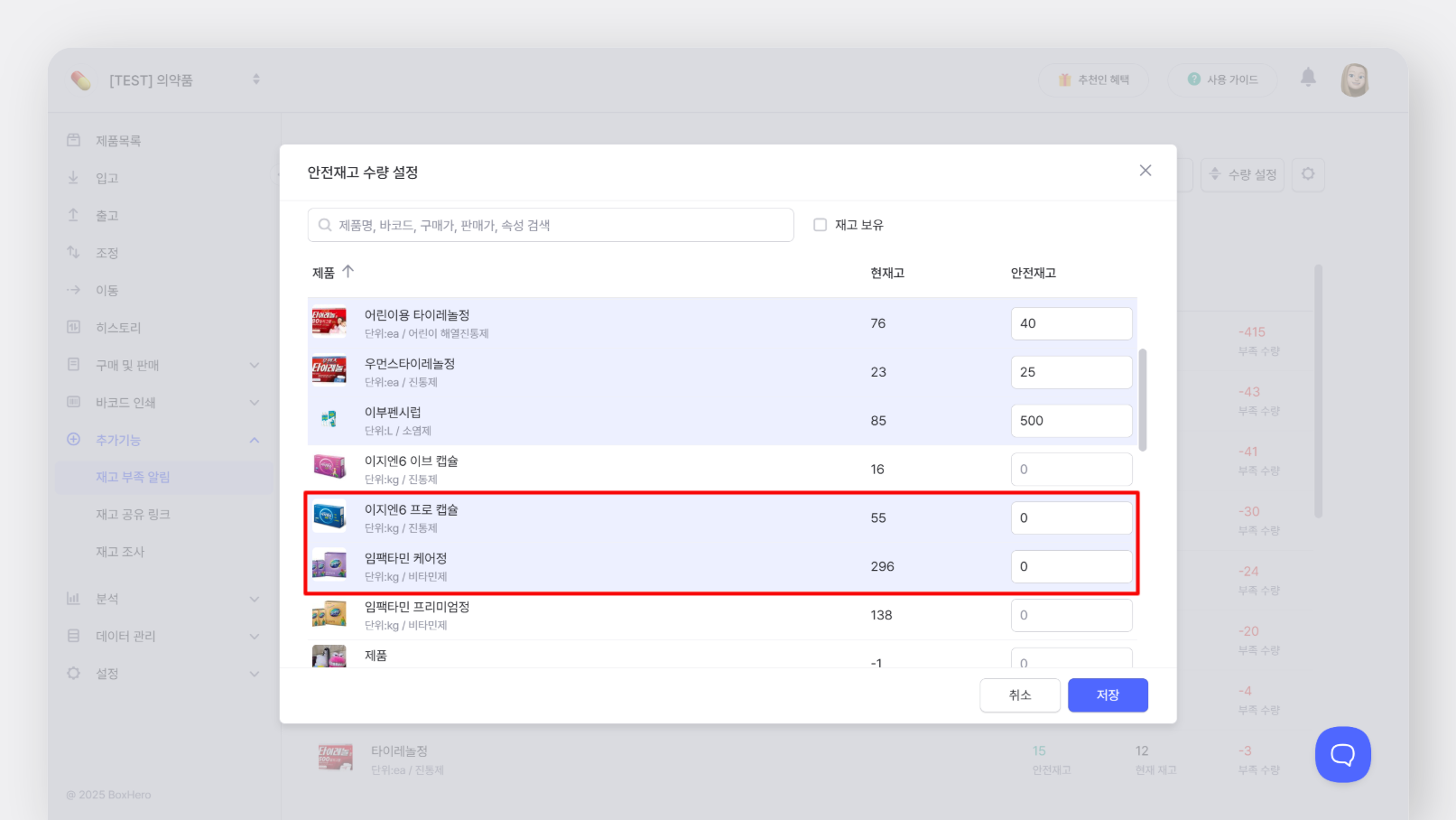
속성이 추가되면 우측 `수량 설정`을 눌러서 제품별 안전 재고 수량을 입력합니다.

안전 재고를 10으로 등록하면, 수량이 10개 **이하**일 때 모바일 앱으로 푸시 알림을 받을 수 있습니다.

{% embed url="<https://customer-0jrbilsa8yt3k758.cloudflarestream.com/6dcaf4e0dfab44a9bb6d6554c7c326fe/iframe?autoplay=true&controls=false&letterboxColor=transparent&loop=true&muted=true&poster=https://customer-0jrbilsa8yt3k758.cloudflarestream.com/6dcaf4e0dfab44a9bb6d6554c7c326fe/thumbnails/thumbnail.jpg?height=1080&preload=true>" %}

안전 재고를 입력할 제품이 많다면 **엑셀**로 대량 입력할 수 있습니다.

1. `데이터 관리` > `제품` > `엑셀 가져오기` > `대량 수정` > `엑셀 양식 다운로드`
2. 다운로드 받은 엑셀 양식의 '안전 재고' 컬럼에 입력
3. 엑셀 파일 업로드

{% hint style="success" %}
안전 재고를 0으로 입력해두면 재고가 모두 소진되었을 때 푸시 알림을 받을 수 있습니다.
{% endhint %}
{% endstep %}

{% step %}
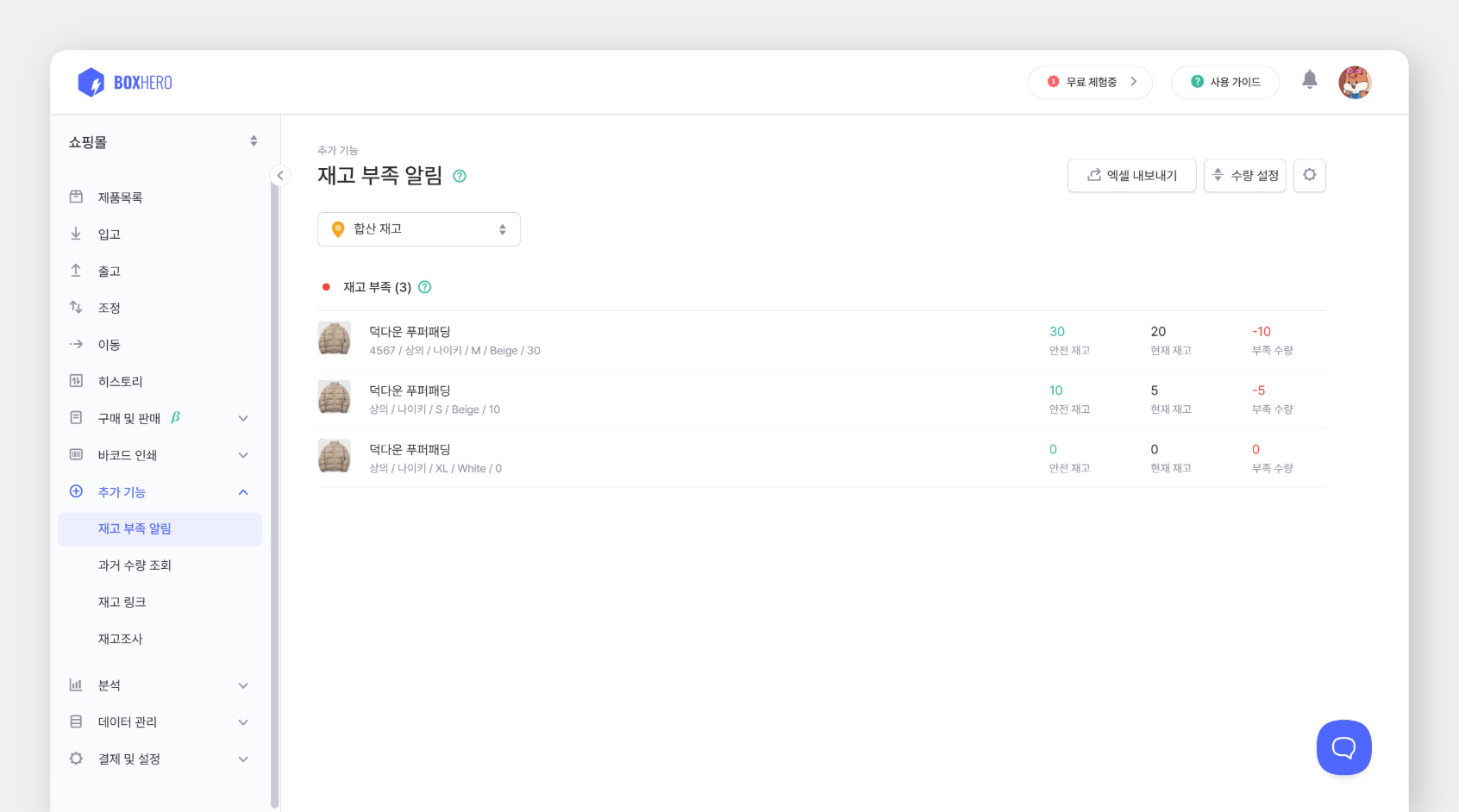
설정이 완료되면 `재고 부족 알림` 메뉴에서 재고가 부족한 제품 목록을 바로 확인할 수 있습니다.

<figure><img src="https://3639913499-files.gitbook.io/~/files/v0/b/gitbook-x-prod.appspot.com/o/spaces%2FnmQcxJVYbkAeUq7yQCkF%2Fuploads%2Fgit-blob-df248ffbf1a12078698badb757fea6d1f030e3cf%2Ffilename%20-%202025-04-07T165241.081.png?alt=media" alt="재고 부족 확인 페이지"><figcaption></figcaption></figure>
{% endstep %}
{% endstepper %}

## 알림 설정 <a href="#set-up-notifications" id="set-up-notifications"></a>

재고 부족 알림을 설정하면 기본적으로 **모든 팀원**에게 모바일 앱 푸시 알림이 발송됩니다. 필요한 경우 `설정` > `알림 설정` 에서 유저별로 알림 조건을 설정할 수 있습니다.

<figure><img src="https://3639913499-files.gitbook.io/~/files/v0/b/gitbook-x-prod.appspot.com/o/spaces%2FnmQcxJVYbkAeUq7yQCkF%2Fuploads%2Fgit-blob-44ab6bb07547ba59404c18296154d14ea3db214e%2Ffilename%20(2).png?alt=media" alt="알림 설정 페이지"><figcaption></figcaption></figure>

* **모바일 ON/OFF:** 푸시 알림을 받고 싶지 않다면 OFF로 설정하세요.
* **알림 대상:** 합산 재고(전체 위치) 또는 특정 위치만 선택해 알림을 받을 수 있습니다.
* **알림 시간:** 원하는 시간을 선택해 알림을 받을 수 있습니다.

{% hint style="warning" %}
푸시 알림이 켜져 있어도 알림이 오지 않는다면 스마트폰에서 앱 알림 설정을 확인해 주세요.
{% endhint %}

## 위치별 설정 <a href="#configure-by-location" id="configure-by-location"></a>

여러 위치를 추가해 사용하는 경우 **각 위치별로 재고 부족 알림을 받을 수 있습니다.** 위치마다 안전 재고 속성을 추가하고 수량을 각각 설정해 주세요.

<figure><img src="https://3639913499-files.gitbook.io/~/files/v0/b/gitbook-x-prod.appspot.com/o/spaces%2FnmQcxJVYbkAeUq7yQCkF%2Fuploads%2Fgit-blob-cb5eb112c68011dbc9ebde44c87887f23536264a%2Ffilename%20-%202025-04-07T173123.967.png?alt=media" alt="위치별 안전재고 등록"><figcaption></figcaption></figure>

{% hint style="warning" %}
위치별 안전 재고를 설정한 뒤, 각 멤버는 `설정` > `알림 설정`에서 원하는 위치의 알림을 개별적으로 설정하세요.
{% endhint %}

***

## <mark style="color:$info;">FAQ</mark> <a href="#faq" id="faq"></a>

### <mark style="color:$info;">이메일로 재고 부족 알림을 받을 수 있나요?</mark> <a href="#id-1" id="id-1"></a>

<mark style="color:$info;">현재 재고 부족 알림은 모바일 앱 푸시로만 받을 수 있습니다.</mark>

### <mark style="color:$info;">특정 위치만 재고 부족 알림을 받을 수 있나요?</mark> <a href="#id-2" id="id-2"></a>

<mark style="color:$info;">네, 원하는 위치의</mark> [<mark style="color:$info;">**재고 부족 알림**</mark>](https://www.boxhero.io/docs/documentation/ko/key-features/low-stock-alert)<mark style="color:$info;">만 받을 수 있습니다. 위치별 안전 재고를 설정한 뒤, 각 멤버가 개별적으로 해당 위치의 알림을 설정해 주세요.</mark>

### <mark style="color:$info;">재고 수량이 0일 때 알림을 받을 수 있나요?</mark> <a href="#id-3" id="id-3"></a>

<mark style="color:$info;">안전 재고 수량을 0으로 설정하면 재고 수량이 0이 되었을 때 알림을 받을 수 있습니다.</mark>

<figure><img src="https://3639913499-files.gitbook.io/~/files/v0/b/gitbook-x-prod.appspot.com/o/spaces%2FnmQcxJVYbkAeUq7yQCkF%2Fuploads%2Fgit-blob-09591b658bff10f9f09f3cc446cf511e6956d76e%2Ffilename%20-%202025-10-15T171841.818.png?alt=media" alt=""><figcaption></figcaption></figure>


---

# Agent Instructions: Querying This Documentation

If you need additional information that is not directly available in this page, you can query the documentation dynamically by asking a question.

Perform an HTTP GET request on the current page URL with the `ask` query parameter:

```
GET https://www.boxhero.io/docs/documentation/ko/key-features/low-stock-alert.md?ask=<question>
```

The question should be specific, self-contained, and written in natural language.
The response will contain a direct answer to the question and relevant excerpts and sources from the documentation.

Use this mechanism when the answer is not explicitly present in the current page, you need clarification or additional context, or you want to retrieve related documentation sections.