> For the complete documentation index, see [llms.txt](https://www.boxhero.io/docs/llms.txt). Markdown versions of documentation pages are available by appending `.md` to page URLs; this page is available as [Markdown](https://www.boxhero.io/docs/faq/ko/inventory-and-transactions/orders.md).
# 구매 및 판매
***
#### 제품에 등록한 구매가/판매가를 변경하면 기존 주문서의 금액도 변경되나요?
아니요. 이미 작성된 주문서의 금액은 변경되지 않고 **그대로 유지**됩니다.
#### 멤버에게 구매가/판매가를 숨길 수 있나요?
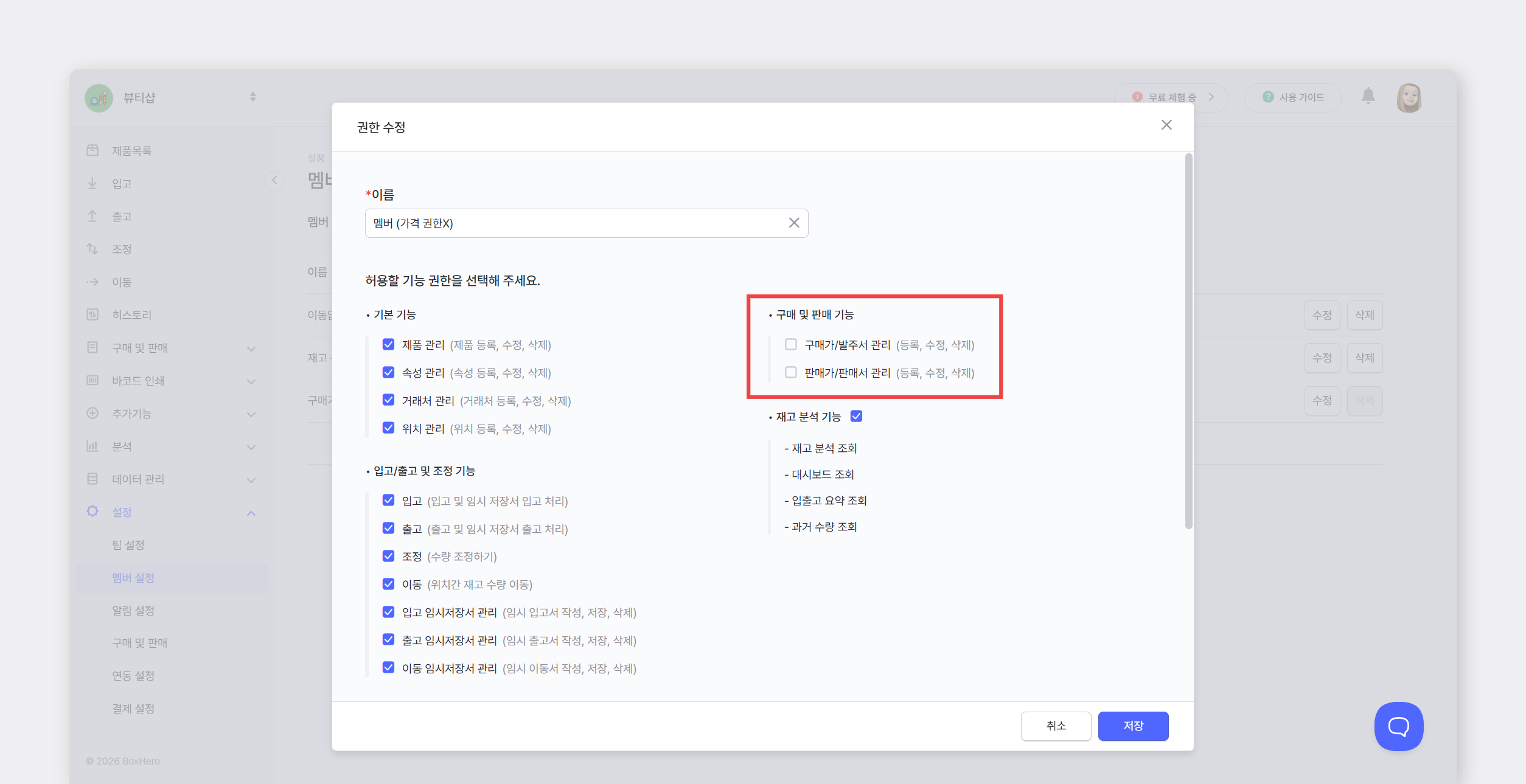
특정 멤버가 구매가/판매가를 조회하지 못하도록 [**커스텀 권한**](/docs/documentation/ko/concepts/members.md#custom-permissions)을 생성할 수 있습니다.
1. `설정` > `멤버 설정` > `커스텀 권한` 에서 `+권한 추가`를 눌러주세요.
2. 권한 이름을 입력하고, 구매가/판매가 권한을 해제한 후 `저장`을 눌러주세요.
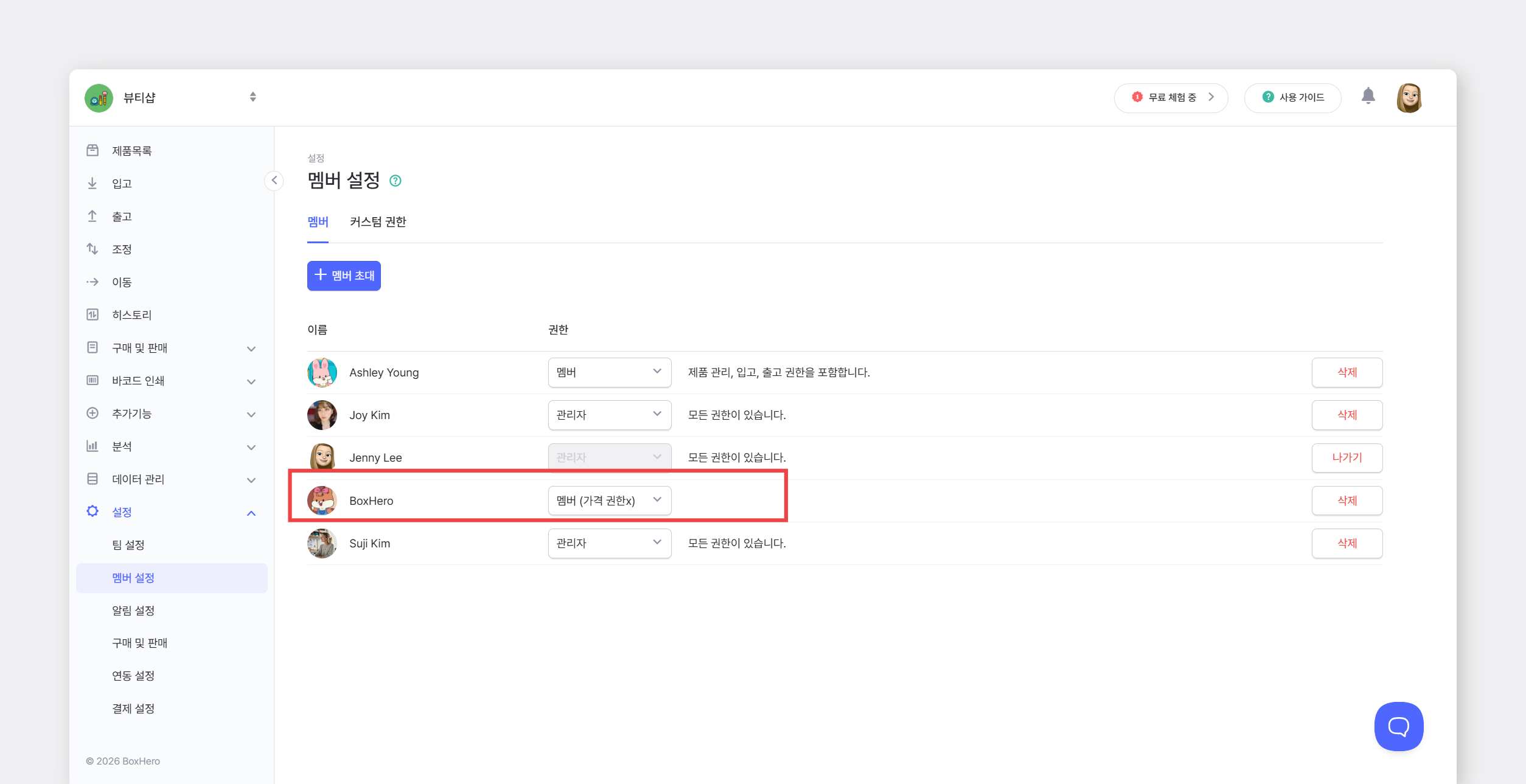
3. 가격을 숨길 직원에게 권한을 부여해 주세요.
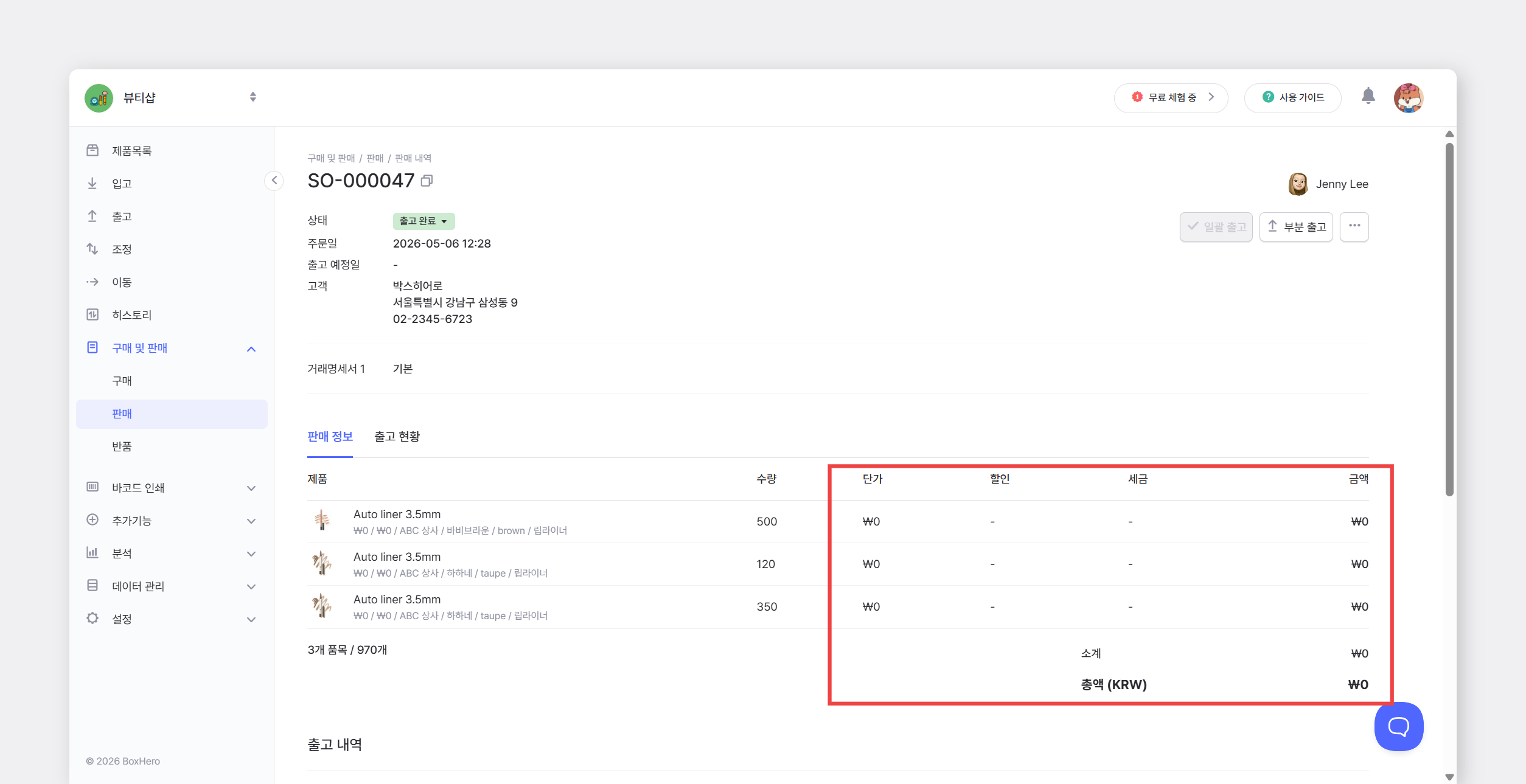
권한이 제한된 멤버에게는 가격 정보가 표시되지 않으며, 제품 정보, 구매 및 판매, 매출 분석 등 **가격이 표시되는 영역에서 모두 0으로 표시**됩니다.
#### 주문서 작성 시 위치를 선택할 수 없나요?
주문서 작성 단계에서는 위치를 선택하지 않습니다. 실제 주문서를 통해 **입고 또는 출고를 진행할 때 위치를 선택**할 수 있습니다.
#### 검수 기능이 있나요?
검수는 `구매 및 판매`의 `부분 입고/부분 출고` 기능을 사용해 주세요.
1. 발주서/판매서를 작성합니다. (이 단계에서는 재고 수량이 변경되지 않습니다.)
2. 실제 입출고 시 담당자가 `부분 입고/부분 출고`를 사용해 검수하며 처리합니다.
* 발주서/판매서에 등록된 제품만 입출고할 수 있습니다.
* 등록된 수량을 초과하여 처리하려는 경우 안내 문구가 표시됩니다.
#### **바코드를 정해진 수량만큼만 스캔하고 싶어요.** 초과 스캔을 막을 수 있나요?
정해진 수량만큼만 정확히 입출고하고, 초과 시 안내를 받고 싶다면, 입고/출고 메뉴가 아닌 `구매 및 판매`를 사용해 주세요. 미리 작성한 [**발주서나 판매서를 기반으로 수량을 정확하게 처리**](/docs/documentation/ko/key-features/purchase-and-sales.md#ship-stock-with-sales-order)할 수 있습니다.
#### 구매 **내역을 반품하려면 어떻게 하나요?**
반품 기능은 판매 건에만 해당되어, 구매 건의 반품은 아래 순서로 처리해 주세요.
1. 발주서를 삭제합니다. 이때 입고 내역은 삭제하지 않고 그대로 둡니다
2. `조정` 기능으로 반품 수량만큼 차감해 현재 수량을 변경합니다. \
메모에는 #반품이라고 기재해 반품 건임을 구분해 둡니다.
위와 같이 해시태그를 남겨두면 `입출고 요약`에서 특정 기간 동안 발생한 반품량을 확인할 수 있습니다.
#### 주문서 우측 상단에 있는 바코드는 어떻게 사용하나요?
이 바코드는 모바일 앱에서 해당 주문서를 빠르게 여는 용도입니다. 창고에서 해당 문서를 들고 입출고할 때, 목록에서 일일이 찾지 않고 바코드를 스캔해 바로 주문서를 열 수 있습니다.
스캔은 박스히어로 모바일 앱에서 가능합니다. 홈 화면에서 `스캔` 버튼을 누른 뒤 바코드를 스캔하면 주문서 상세 페이지로 바로 이동합니다.
#### 발주서나 판매서에 서명란을 추가할 수 있나요?
별도의 서명란 기능은 제공하지 않지만, **푸터를 활용해 서명란을 직접 만들 수 있습니다.** 푸터에서 줄바꿈과 공백을 사용할 수 있어 발주서/판매서 하단을 원하는 형태로 구성할 수 있습니다.
예를 들어 **'담당자 서명 : \_\_\_\_\_\_\_\_\_\_\_\_\_\_\_\_\_\_'**과 같이 입력하면 발주서/판매서 하단에 고정적으로 표시됩니다.
* 설정 경로 : `설정` > `구매 및 판매` > `인쇄 템플릿`
#### 등록한 세금과 할인은 어떻게 삭제하나요?
`설정` > `구매 및 판매`에서 수정하거나 삭제할 수 있습니다.
#### 반품 내역이 매출 분석에 표시되지 않아요.
반품 내역은 판매일이 아닌 반품 처리일 기준으로 매출 분석에 반영됩니다. 선택한 기간에 반품일이 포함되어 있는지 확인해 주세요.
#### 매출 분석에서 원하는 데이터를 확인할 수 없어요
[**커스텀 리포트**](/docs/documentation/ko/other-features/custom-analytics.md)를 이용하면 사용자가 원하는 조건으로 데이터를 조회하고 엑셀로 다운로드받을 수 있습니다.
#### 입고, 출고, 조정 내역이 매출 분석에 반영되나요?
`매출 분석`은 작성된 발주서와 판매서를 기준으로 집계됩니다. 따라서 `입고`, `출고`, `조정` 메뉴에서 직접 처리한 재고 변경 내역은 매출 분석에 반영되지 않습니다.
#### 주문서를 보낼 때 발신자를 제 메일 주소로 바꿀 수 있나요?
주문서를 메일로 발송할 경우, 발신자 주소는 박스히어로 시스템 메일인 `support@boxhero.io`로 표시됩니다. 대신 **고객님의 이메일 주소는 회신받을 주소로 설정**됩니다. 또한받는 분이 사용 중인 메일에서 답장 기능을 사용하면 답장은 고객님의 이메일로 전송됩니다.
{% hint style="success" %}
원하는 답변을 찾지 못하셨다면 [**고객센터**](/docs/documentation/ko/resources/contact.md)로 문의해 주세요.
{% endhint %}