> For the complete documentation index, see [llms.txt](https://www.boxhero.io/docs/llms.txt). Markdown versions of documentation pages are available by appending `.md` to page URLs; this page is available as [Markdown](https://www.boxhero.io/docs/other-features/analytics.md).

# Inventory Reports

<figure><img src="/files/Lyr6cDKXKa6iYtez1gIu" alt=""><figcaption></figcaption></figure>

***

## Inventory Reports Overview

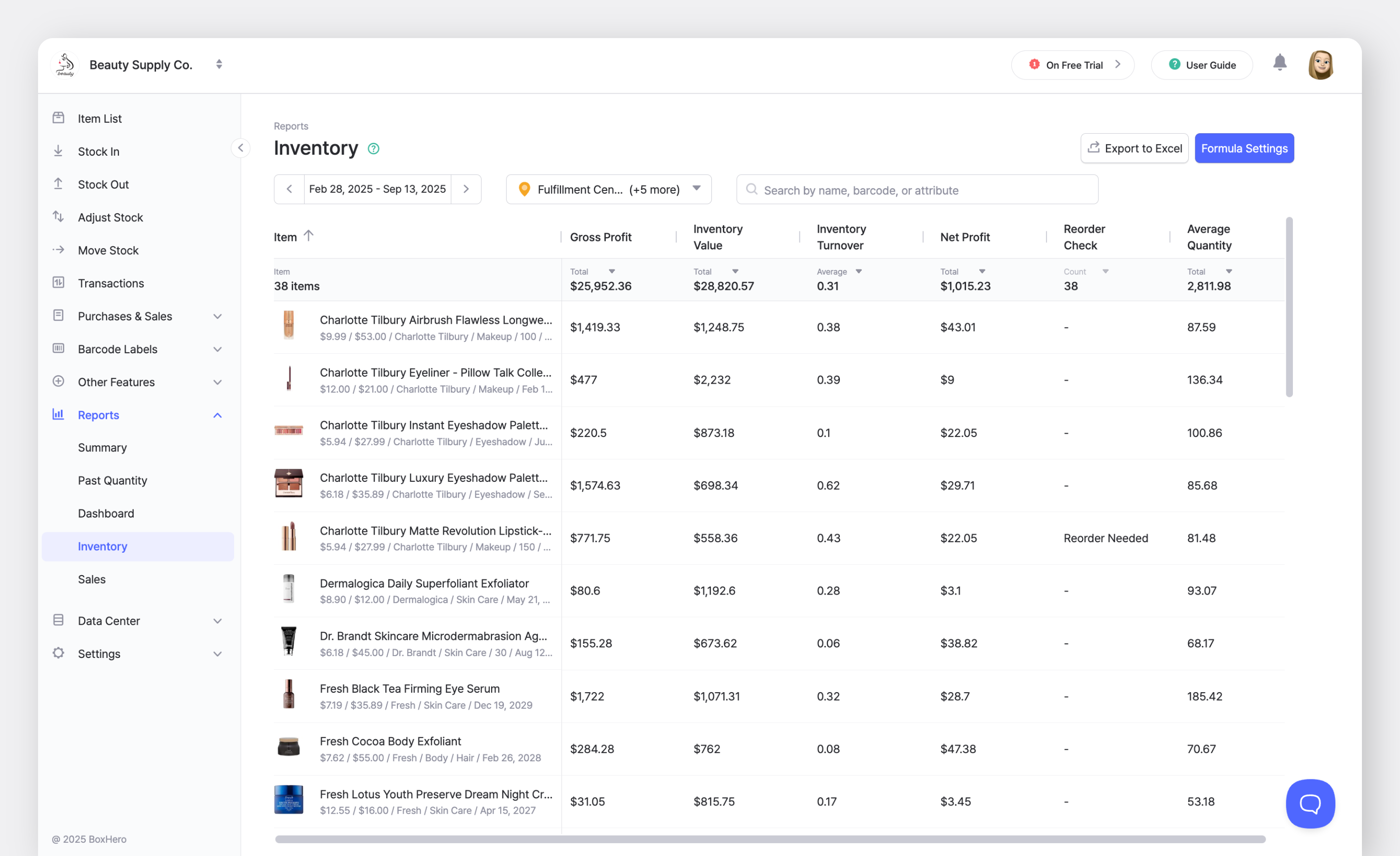
In the sidebar, go to <mark style="color:blue;">**`Reports`**</mark> > <mark style="color:blue;">**`Inventory`**</mark>.

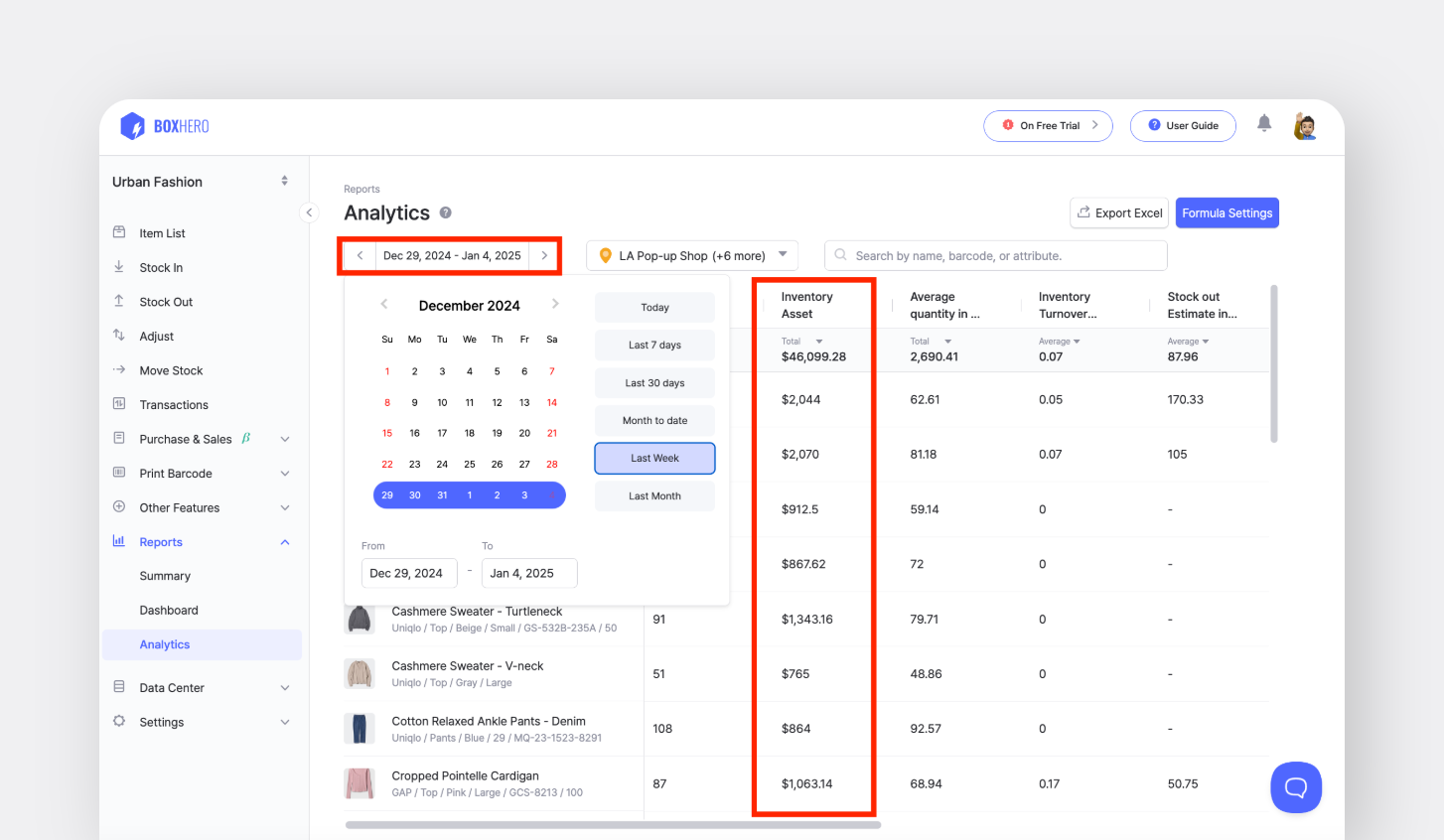
You can adjust formula settings to analyze your inventory data, filter results by location or date range, and export reports to Excel for recordkeeping and analysis.

<figure><img src="/files/gh3gWyb593fL1wF19rGg" alt=""><figcaption></figcaption></figure>

### A. Quick Add

Quickly add from our predefined, commonly-used formulas and generate insightful reports.

{% embed url="<https://customer-0jrbilsa8yt3k758.cloudflarestream.com/75a44bd8bef54f0eaffffe6c74fc86e7/iframe?autoplay=true&controls=false&letterboxColor=transparent&loop=true&muted=true&poster=https://customer-0jrbilsa8yt3k758.cloudflarestream.com/75a44bd8bef54f0eaffffe6c74fc86e7/thumbnails/thumbnail.jpg?height=1080&preload=true>" %}

#### Item Attributes

You can use [attributes](/docs/concepts/attributes.md) with numerical values to create formulas.

#### Sales & Profit

* **Total Purchase Amount**: Cost x Total Stock In Quantity
* **Total Sales Amount**: Price x Total Stock Out Quantity
* **Net Profit**: Price - Cost
* **Gross Profit**: (Price - Cost) x Total Stock Out Quantity
* **Profit Rate**: (Price - Cost) ÷ Price
* **Daily Average Profit**: (Price x Total Stock Out Quantity ÷ Number of Days
* **Daily Average Gross Profit**: (Price - Cost) x Total Stock Out Quantity ÷ Number of Days

#### **Inventory & Movement**

* **Inventory Value**: Cost x Current Quantity
* **Inventory Turnover Ratio**: Total Stock Out Quantity ÷ Average Quantity in a Period
* **Average Daily Stock In**: Total Stock In Quantity ÷ Number of Days
* **Average Daily Stock Out**: Total Stock Out Quantity ÷ Number of Days
* **Reorder Status**: if(Current Quantity < Safety Stock, "Reorder Needed", "-")
* **Stockout Forecast in Days**: Current Quantity ÷ (Total Stock Out Quantity ÷ Number of Days)

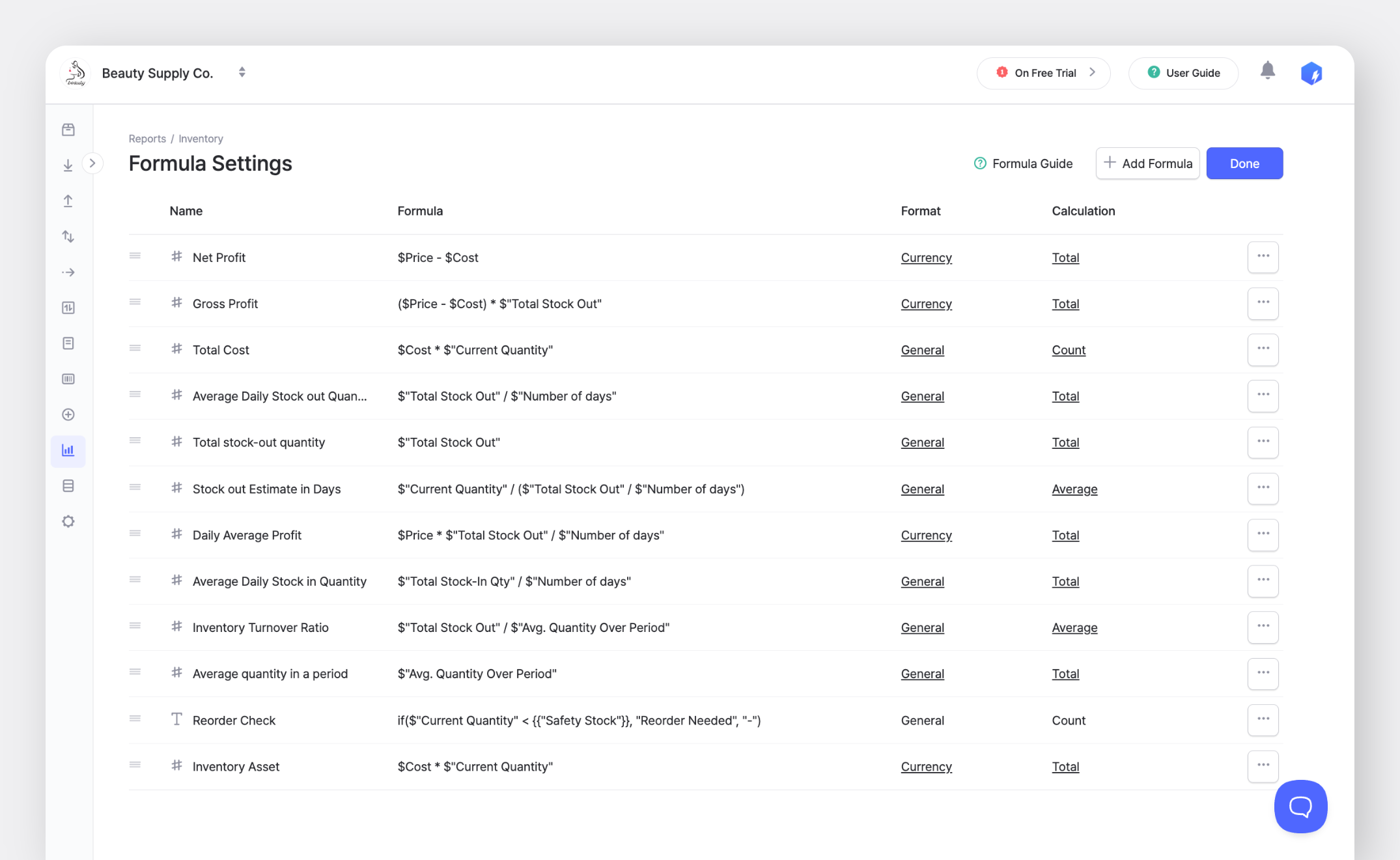
<figure><img src="/files/3rN0AkgXCRjDU8pLntPf" alt=""><figcaption></figcaption></figure>

{% hint style="warning" %}
When updating item costs or prices, be aware that <mark style="color:blue;">**`Reports`**</mark> calculations use *current* values. For historical accuracy, consider using the <mark style="color:blue;">**`Purchases & Sales`**</mark> feature or exporting data regularly.
{% endhint %}

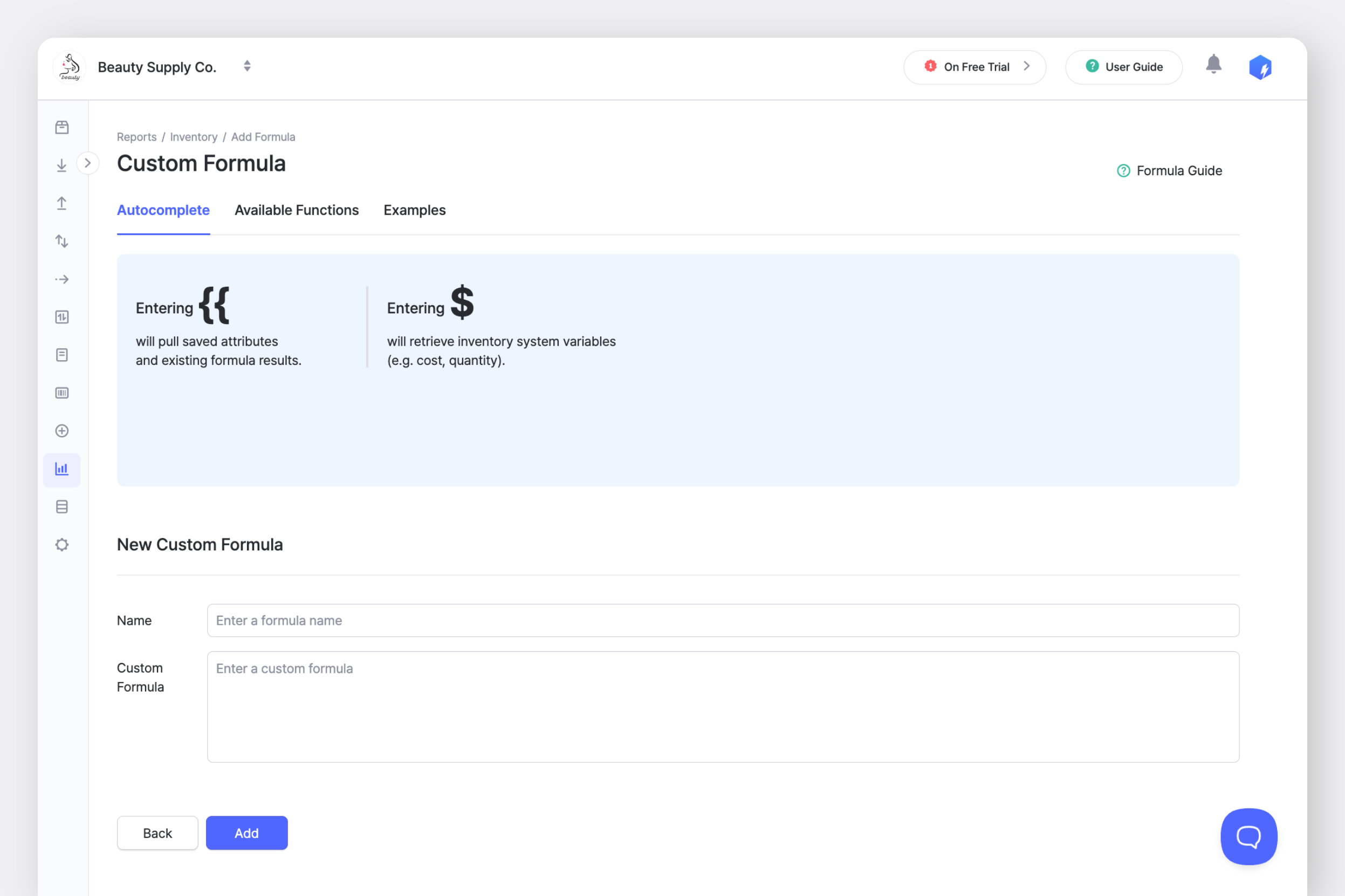
### B. Custom Formula

Create unique formulas that meet your needs using BoxHero’s variables and functions.

<figure><img src="/files/IYvvexe75YFr3jrj4B2R" alt=""><figcaption></figcaption></figure>

#### Autocomplete Variables

Enter `$` to access inventory variables and `{{` to retrieve saved attributes/values.

<table><thead><tr><th width="209">Variable Name</th><th>Description</th></tr></thead><tbody><tr><td><strong>Current Quantity</strong></td><td>The current inventory level of items.</td></tr><tr><td><strong>Number of Days</strong></td><td>The number of days in the analysis period.</td></tr><tr><td><strong>Average Quantity in a Period</strong></td><td>Average inventory during the analysis period, calculated using the inventory quantity at 23:59:59 each day.</td></tr><tr><td><strong>Initial Quantity in a Period</strong></td><td>Inventory at the start of the analysis period (i.e. 23:59:59 on the <em>day prior to the start date</em> for the selected period).</td></tr><tr><td><strong>Final Quantity in a Period</strong></td><td>Inventory at the end of the analysis period (i.e. 23:59:59 on the <em>last day</em> of the selected period).</td></tr><tr><td><strong>Total Stock-In Quantity</strong></td><td>Total inbound quantity.</td></tr><tr><td><strong>Stock-In Frequency</strong></td><td>The number of times an inbound transaction was made during a specific period.</td></tr><tr><td><strong>Total Stock-Out Quantity</strong></td><td>Total outbound quantity.</td></tr><tr><td><strong>Weighted Stock-Out Average (linear: 2, 3, 4)</strong></td><td><p>Calculates the weighted average of daily outgoing quantities, giving more importance to <em>recent</em> data. Each day in the selected period gets a weight, with the weight increasing linearly each day. Daily stock-out quantities are multiplied by their weights, and the sum of these weighted quantities is divided by the sum of the weights. The linear weighting includes three options:</p><ul><li>Linear weight 2: Oldest day has weight 1, most recent day has weight 2</li><li>Linear weight 3: Oldest day has weight 1, most recent day has weight 3</li><li>Linear weight 4: Oldest day has weight 1, most recent day has weight 4</li></ul></td></tr><tr><td><strong>Stock-Out Frequency</strong></td><td>The number of times an outbound transaction was made during a specific period.</td></tr><tr><td><strong>Variation Quantity from Adjust</strong></td><td>The difference in inventory quantity from using the <strong>Adjust</strong> menu (i.e. Increased Quantity - Decreased Quantity)</td></tr><tr><td><strong>Decrease Quantity from Adjust</strong></td><td>The decrease in quantity from using the <strong>Adjust</strong> menu.</td></tr><tr><td><strong>Increase Quantity from Adjust</strong></td><td>The increase in quantity from using the <strong>Adjust</strong> menu.</td></tr><tr><td><strong>Adjust Frequency</strong></td><td>The number of times an <strong>Adjust</strong> transaction was made during a specific period.</td></tr><tr><td><strong>Variation Quantity from Move</strong></td><td>The difference in inventory quantity from using the <strong>Move</strong> menu (i.e. Increased Quantity - Decreased Quantity)</td></tr><tr><td><strong>Decrease Quantity from Move</strong></td><td>The decrease in quantity from by using the <strong>Move</strong> menu.</td></tr><tr><td><strong>Increase Quantity from Move</strong></td><td>The increase in quantity from by using the <strong>Move</strong> menu.</td></tr><tr><td><strong>Move-Out Frequency</strong></td><td>The number of times a <strong>Move</strong> transactions were was made to decrease the overall inventory level.</td></tr><tr><td><strong>Move-In Frequency</strong></td><td>The number of times a <strong>Move</strong> transactions were was made to increase the overall inventory level.</td></tr></tbody></table>

{% hint style="success" %}
**Pro Tip**: Use *weighted averages* for more nuanced trend analysis and *combine formulas* to create complex metrics by nesting functions with variables.
{% endhint %}

#### Available Functions

BoxHero supports a variety of functions that are similar to Excel for creating custom formulas.

* **Basic arithmetic:** `+`, `-`, `*`, `/`
* **Conditional**: `if(condition, value_if_true, value_if_false)`
* **Rounding:**
  * **round**: `round(number, decimal_places)`
  * **roundUp**: `roundUp(number, decimal_places)`
  * **roundDown**: `roundDown(number, decimal_places)`
* **Type Conversion:**
  * **toNumber**: `toNumber(string, fallback_number)`
    * String to be converted into a numeric value, Number to show when conversion fails
  * **toString**: `toString(number)`
    * Number to be converted into a string

<figure><img src="/files/nbyifvJKuMqM2ZR8Nqm6" alt=""><figcaption></figcaption></figure>

{% hint style="info" %}
Variables and functions not available in <mark style="color:blue;">**`Inventory Reports`**</mark> can be used in [Custom Analytics](/docs/other-features/custom-analytics.md).
{% endhint %}

***

## Frequently Asked Questions

**Looking for more info?** Browse our FAQ:

{% content-ref url="/spaces/mkYNU2xLl20GSI6NQQ6q/pages/HABeINmjzAqEWNjoxMLv" %}
[Inventory reports](/docs/faq/reporting/inventory-reports.md)
{% endcontent-ref %}