How to Set a 2027 Purchasing Budget From This Year's Sales
The last week of December is when suppliers start asking for spring orders and your accountant wants to know what you plan to spend on inventory next year. The quickest answer is to take this year’s total spend and add a little. But that total also includes items that sold slower than planned, clearance markdowns, and products you’ve since dropped.
A more reliable answer comes from what each item sold. For every item, each month’s purchase comes down to three numbers: what it sold, how much stock you want left at the end of the month, and what you already have. That calculation is called open-to-buy, and 12 months of it make up your purchasing budget.
Here’s how those terms are used in this guide:
- Open-to-buy (OTB) is the amount you can purchase for a given month after accounting for the stock you already have and what's already on order.
- A purchasing budget is the twelve monthly OTB numbers for the year, usually expressed at cost.
- Target ending inventory is the stock you want on hand at the end of the month to cover the next month's sales.
This post follows on from our guides to the inventory-to-sales ratio and dead stock. If you've already cleared slow items this year, the steps below show how to keep those sales from inflating next year's budget.
Pull This Year's Units Sold by Item and Month
This year's units sold are a better starting point than revenue. Prices shift over the year with markdowns, supplier increases, and bundle discounts, so revenue can go up even when you sold the same number of units.
More specifically, the number to track for each item is net units sold per month: units sold minus units returned. Returned units went back into stock, so leaving them in would overstate how much you need to buy. You'll want this number for every item you plan to carry next year, including slow sellers.
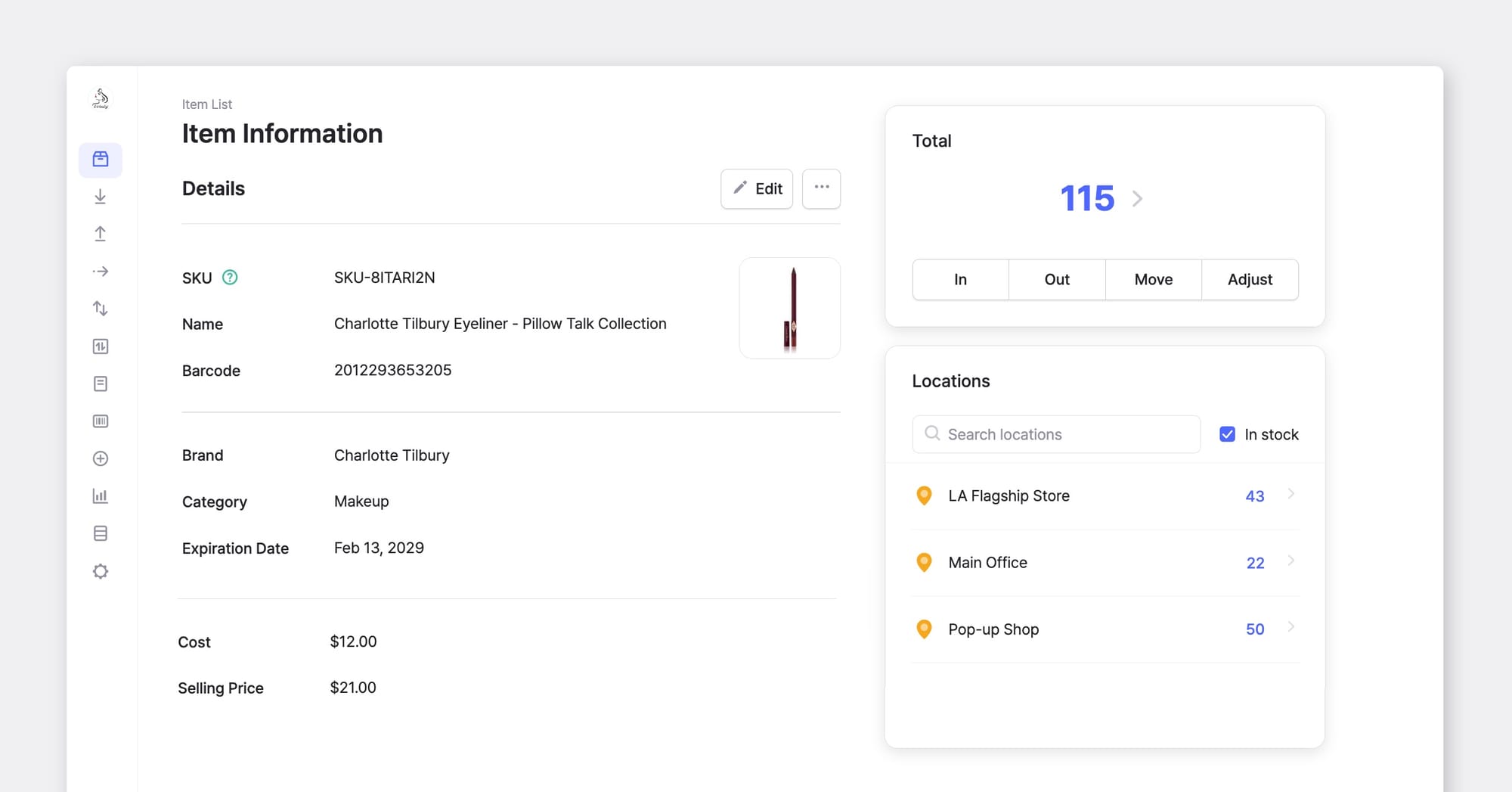
For example, here's what the Charlotte Tilbury Eyeliner - Pillow Talk Collection ($21 retail, $12 cost) sold each month in 2026:
| Month (2026) | Net units sold |
|---|---|
| Jan | 140 |
| Feb | 130 |
| Mar | 170 |
| Apr | 210 |
| May | 260 |
| Jun | 300 |
| Jul | 310 |
| Aug | 280 |
| Sep | 220 |
| Oct | 190 |
| Nov | 260 |
| Dec | 330 |
| Total | 2,800 |
If December isn't over yet, scale the days you have to a full month (e.g., 213 units by December 20 × 31 ÷ 20 = 330).
In BoxHero, the Profit Analysis tab of Sales Reports shows Sales Qty and Return Qty for each item over any date range you pick.
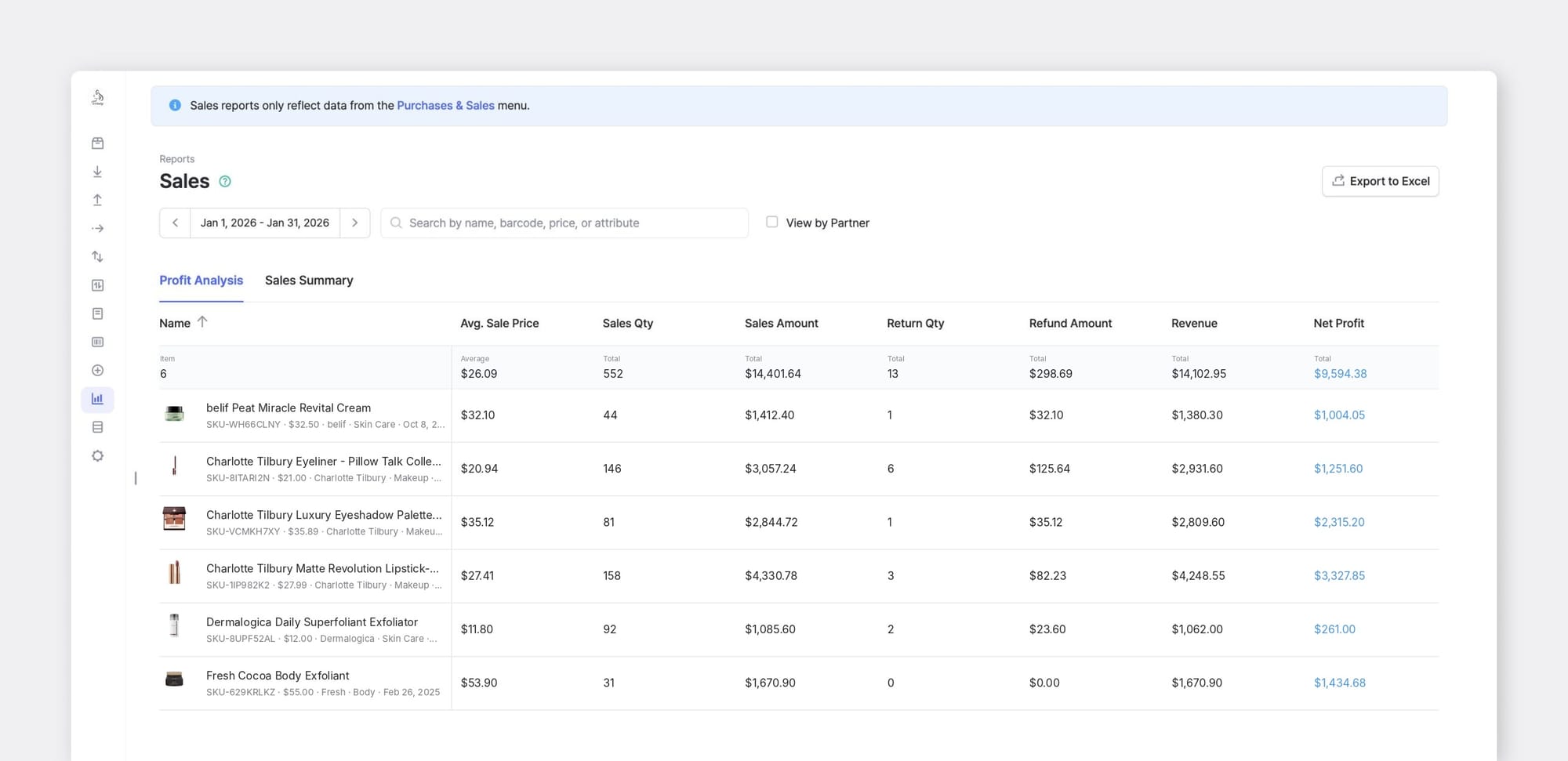
Stock Out won't appear in Sales Reports, which only include Purchases & Sales transactions. If your team recorded some sales that way, add those quantities to your totals.Turn Units Sold Into a Monthly Purchase Budget
Each month's buy comes from one formula:
= Planned sales + Target ending inventory − Stock on hand
(If anything is already on order, subtract that too.)
In plain terms, you buy enough to cover the month's sales and leave the right amount for next month, minus what's already there.
1. Take Out Clearance Sales
Clearance sales won't repeat next year, so leaving them in would inflate the plan for those months. In the eyeliner example, September's 220 units included 80 eyeliners in a discontinued shade that were marked down to clear them out. Taking those out leaves September at 140.
A dip in Average Sales Price in Sales Reports is the quickest way to spot months like this, since markdown sales pull the average below the months around it.

2. Set Planned Sales and Target Stock
Planned sales are this year's units plus the growth you expect. The item's own recent trend is a better guide than a store-wide revenue goal, since a revenue target can be met through price increases rather than more units. If the eyeliner's sales have been trending up, a modest 5% increase turns January's 140 units into 147.
Target ending inventory is the stock you want left at the end of the month, set as a multiple of next month's planned sales. At 1.2, January should end with enough stock for February's sales plus 20%, which works out to 164 units.
3. Calculate the Buy
The eyeliner starts January with 210 units, so January's buy is 147 + 164 − 210 = 101 units. Repeating that for each month gives you the full year:
| Month | Units to buy | Buy at cost |
|---|---|---|
| Jan | 101 | $1,212 |
| Feb | 188 | $2,256 |
| Mar | 229 | $2,748 |
| Apr | 284 | $3,408 |
| May | 323 | $3,876 |
| Jun | 328 | $3,936 |
| Jul | 288 | $3,456 |
| Aug | 117 | $1,404 |
| Sep | 211 | $2,532 |
| Oct | 288 | $3,456 |
| Nov | 361 | $4,332 |
| Dec | 107 | $1,284 |
| Total | 2,825 | $33,900 |
The monthly buy doesn't follow sales one-for-one.
August's buy is small because September's planned sales are low after the clearance adjustment, so less stock needs to carry over. November's is the largest because it has to cover November's sales and set up December, the busiest month of the year.
Adjust the Budget for Dead Stock You've Already Cleared
If you cleared dead stock this year (items marked down, bundled, or written off because they stopped selling), two adjustments keep it from shaping next year's budget.
A. Leave Out Discontinued Items
Let's say the store also carried a Dermalogica Daily Superfoliant Exfoliator that you cleared out in the fall and stopped selling. Rolled forward like everything else, it would add more than $10,000 to next year's budget for an item you no longer stock.
The same goes for dead units still on hand (written off but not yet donated or liquidated, for example). They won't cover next year's sales, so they shouldn't count as stock on hand, or the buy for items that do sell will come out too low.
B. Start Replacements Small
If a new item is taking the old one's place, a small first order lets its own sales set later buys instead of assuming it will sell like the item it replaced.
Here, a first order of 180 Dr. Brandt Microdermabrasion Age Defying Exfoliators (about $1,100 at cost) covers roughly three months at the old item's pace. Once it has a couple of months of sales, the same formula can set the rest of its year.

Build the Budget Report and Chart in BoxHero
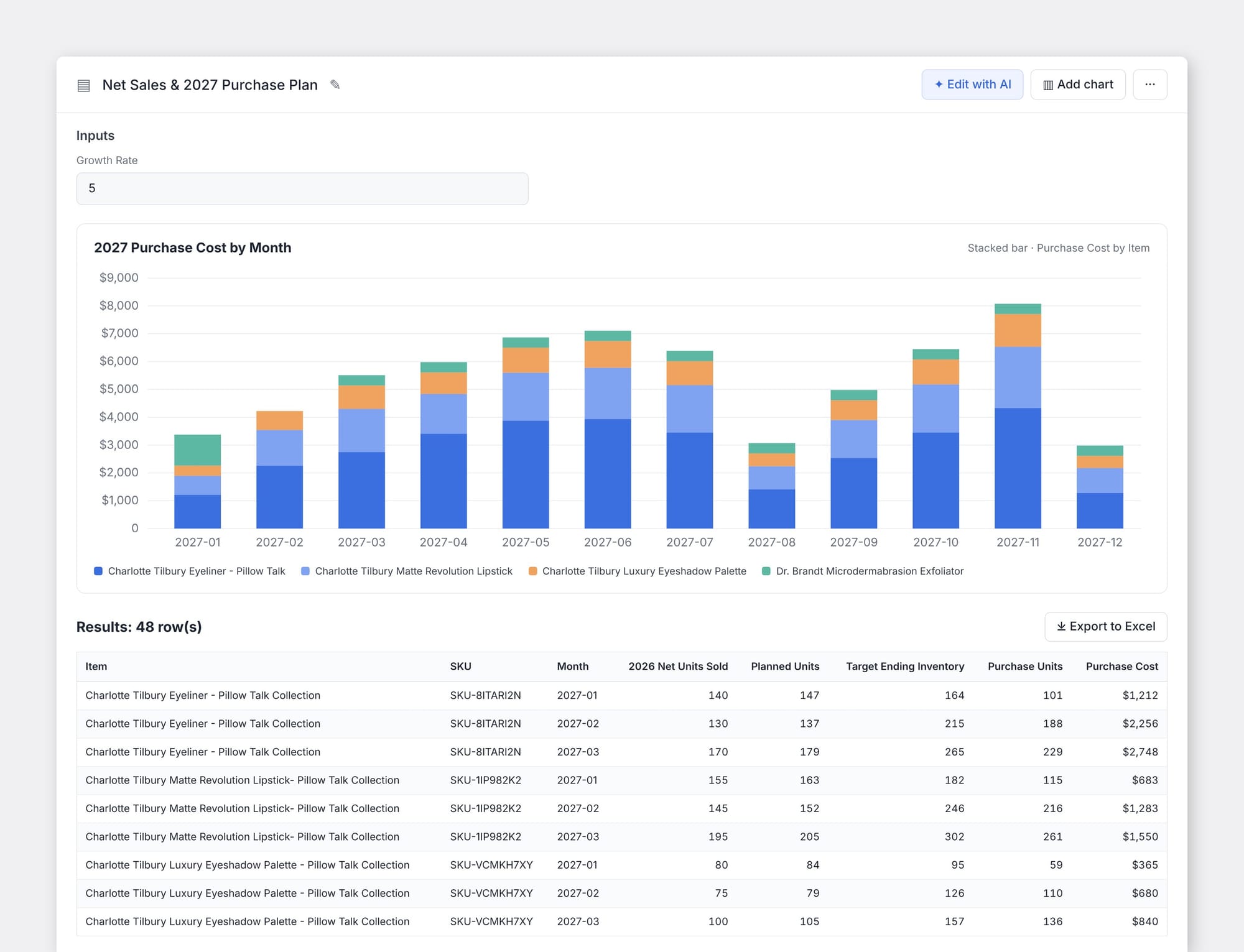
Working this out by hand is manageable for a few items. For a full catalog, Custom Analytics can build the whole plan from a plain-language request to its AI Assistant.
- Go to
Reports>Custom Analyticsand click+ New Report. Click the sync button at the bottom left first so this week's orders are included. - Spot-check one item against
Sales Reports(e.g., the Pillow Talk eyeliner, March 2026, 170 units), then clickAdd Chartfor a stacked bar chart of purchase cost by month.
Describe the report, for example:
"Show net units sold (sales minus returns) by item and month for 2026, excluding discontinued items.
Add 2027 planned units with a growth rate input field, target ending inventory at 1.2× next month's planned units, and monthly purchase units and cost."
Recalculate Next Month's Buy With Actual Stock
The January budget is a starting point, not a fixed order schedule. Because the formula subtracts what's on hand, rerunning it each month with your actual stock count adjusts the next buy on its own.
For example, if the eyeliner sells fewer units than planned in February, it starts March with extra stock, so March's buy comes out smaller by the same amount. The rest of the plan stays the same.
If an item misses or beats plan by a wide margin (say, more than 15%) two months in a row, it's worth revising its planned sales for the rest of the year. An item that stops selling altogether is a different case: pause its open purchase orders and review it as potential dead stock.
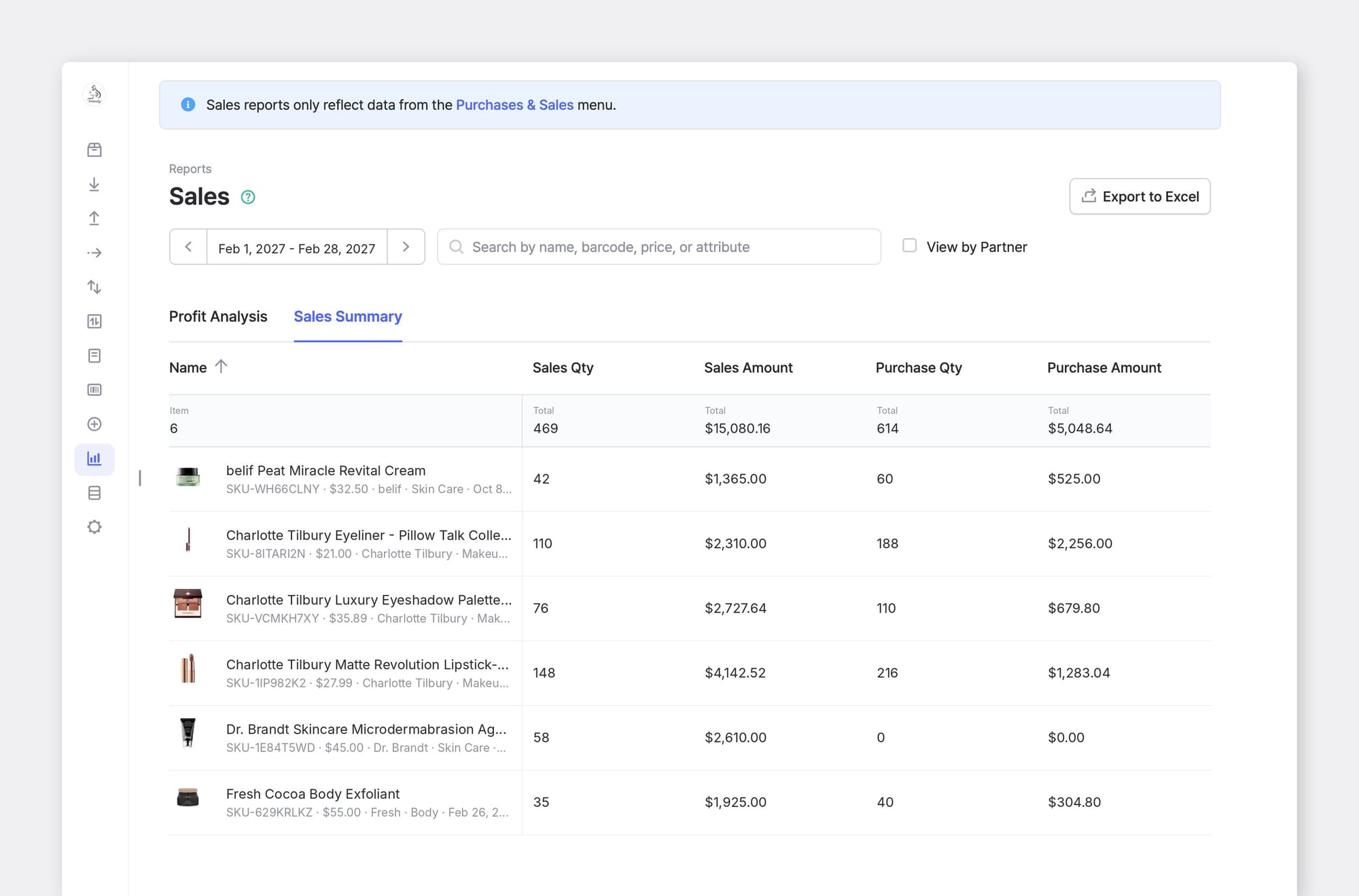
The Sales Summary tab in Sales Reports shows each month's actual Purchase Amount and Sales Qty to compare against the plan.
Set Up Your 2027 Budget This Week
Most of the work happens up front: pulling this year's units, taking out clearance sales, and leaving out items you no longer carry. After that, the budget is one formula applied month by month.
Saved as a Custom Analytics report and rerun at the start of each month, it keeps each purchase order tied to what's actually selling.
After the first quarter, compare each item's target ending inventory with actual month-end stock and adjust its multiple if it ran consistently high or low.
RELATED POSTS
 Ahrom Yoo
 Heehong Moon

 Nahi Kim