How to Convince Your Boss to Invest in Inventory Management Software

The people responsible for counting inventory every day are often the first to see the need for better inventory software. The challenge is getting buy-in from the people who control the budget.
Capterra's recent review of 650+ conversations with inventory software buyers found that most teams hesitate for the same reasons: the cost and time it takes to train staff, onboard, and implement a new system.
Those hesitations usually surface as a few direct questions. How much will it cost? Will the team actually use it? Isn't our spreadsheet good enough? Underneath all of them is one underlying tradeoff: whether the payoff is worth the price.
This guide covers the four concerns decision-makers raise most often, explains what's behind each one, and provides data points, talking points, and short conversation scripts you can use to make the case for inventory software.
1. When the current system seems good enough: put the time it costs in numbers
The manager who approves the budget usually isn't the one logging a receiving order or tracking down a miscount. The work happens out of their view, so it's easy to underestimate the pain points. General complaints like "we're always behind" won't move them, because every job has friction.
Specific numbers will. For one week, track the routine that nobody measures:
- How many times a day someone asks, "Do we have this in stock?" and roughly how long each answer takes
- How long it takes to log receiving and shipping when that work gets done at the end of the day or week
- How many count corrections happened last month, and how long each one took to track down
Once that's written down, you can put a concrete figure in front of the person who signs off on spending.
"I've been keeping track of how much time we spend just keeping inventory straight, and it's more than I expected. People ask whether something's in stock a dozen or so times a day, and I'm still writing receiving down by hand and entering it later.
Last month, we had to fix the count nine times. That adds up to a lot of hours every week. Can I pull together a quick breakdown and walk you through it before the next order goes in? I think there's a way to cut most of it out."
2. When the price looks too high: add up what manual tracking already loses
"Isn't that expensive?" almost always means "show me this pays for itself." Answering with "it's not that much" misses the point.
Convert current time into dollars. Take the time logging and checking stock costs each day.
An hour a day is about 20 hours a month across 20 working days. Multiply that by the loaded hourly cost of whoever does the work. Then add what wrong counts cost: rush reorders, write-offs on stock that expired or went obsolete, and sales lost when an item the records showed as available turned out to be gone.

The upside of fixing this is measurable. In a controlled study by ECR Retail Loss, correcting inventory records raised sales by an average of about 6% across the retailers tested.
Put the software's monthly price next to two of your own numbers, the hours you'd recover and the losses you'd avoid, and the discussion shifts away from sticker price.
"I added up what our current setup actually costs us. Between counts and fixing mistakes, we're spending close to 20 hours a month, which is around $600 in time, plus the rush orders and the stock we wrote off last quarter. The software we'd use runs about $40 a month.
Can I lay those next to each other so you can see how it pays for itself?"
3. When a spreadsheet seems fine: show where it stops working
A spreadsheet records items and quantities, and a careful person can keep one going for a while. But really, spreadsheets are built for sorting and calculating — not for tracking stock that several people change throughout the day.
They also carry more risk than they look like they do. A single typo in a quantity column, or a formula that didn't copy down, can sit there uncorrected for months.
It gets worse when one person handles receiving, shipping, counts, and records at once, since no one else can update the file reliably while they're out.
Here's how spreadsheets and inventory software compare:
| Situation | Spreadsheet | Inventory software |
|---|---|---|
| Two people updating at the same time | Edits overwrite each other | Everyone works from one shared record |
| An item hits its reorder level | Nothing flags it, so it runs low unnoticed | An automatic low stock alert |
| Tracing a wrong count | No record of who changed a number or when | A full transaction history with names and timestamps |
| A second storage location | Another tab to sync by hand | Every location in a single view |
"The spreadsheet was fine when I was the only one in it. Now that a few of us update it, we keep overwriting each other, and I've had to redo a count twice this month because of it.
Could we look at something where we all work off the same list and I can see who changed what?"
4. When you're worried the team won't adopt it: run a small pilot
This is the most grounded of the four worries. When software feels awkward to use, people quietly go back to their old way of doing things, and the company keeps paying for a tool nobody opens.
Gartner estimates that as much as 25% of what companies spend on software goes to tools that barely get used, so a manager who has paid for one of those is right to be cautious.
Set it up as a small trial first. Pick 20 to 50 items that move most often, put one or two people on the software for their real work, and watch how it goes: whether entering stock is quick, whether people can find what they need, and whether anyone needed training to get started. After a month, you'll know how the team actually takes to it.
A free trial works better than a sales demo here, since you're testing the real tool with your own items. BoxHero is free for 30 days with no credit card and includes every feature, so the trial shows how it actually works.
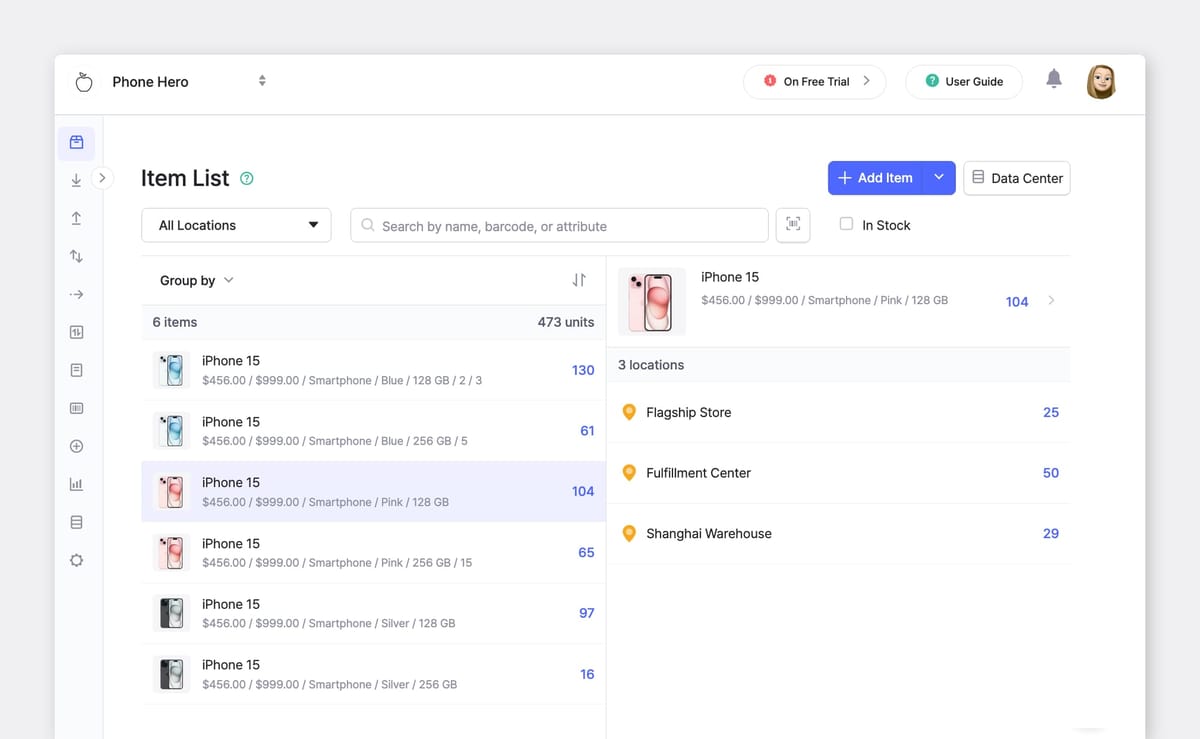
"Before we commit to anything, let me set up a free trial and run our top 30 items through it for a month with John. We'll see if it's quick to use and whether it cuts down the time we spend on counts.
If it works, we roll it out to the rest of the team; if not, we stop, and it hasn't cost us anything."
What to bring to the meeting
Every one of these concerns comes back to the same thing: the person holding the budget wants to see real numbers. Before you bring up the need for inventory software, spend a week writing down how much time inventory takes and what a wrong count costs you. Don't forget to pick a handful of items you'd run through a trial first, and sign up to try BoxHero for free!