AI for Inventory Management: Use Cases for Small Businesses

If you’re a small business owner or solo operator, the "AI conversation" can feel overwhelming — like something that requires time, technical skills, or a team of data scientists or analysts you don’t have.
The good news is that it’s much simpler than it sounds. You don't need a bunch of LLM experts to get started. If you can export a spreadsheet, you can already use AI to save time this week.
Most orgs are already moving in this direction. In ABI Research's 2025 survey, more than 90% of supply chain teams planned to use AI for demand forecasting, and 76% saw real potential for AI agents to handle reordering. The same tools are now in reach of any small business using tools like ChatGPT, Claude, and Gemini.
There are 3 practical places to start: building inventory reports, spotting trends, and improving reorder timing. You can easily do these by pasting a spreadsheet export into a chatbot, or using the AI tool built into your inventory app or software.
Use Case 1: Create Inventory Reports
Do month-end or quarter-end reports sound familiar? Putting together the same reports over and over can be frustrating. It often means digging through records, building pivot tables, and rewriting the same summaries every month.
Fortunately, AI can turn your inventory data into a clear report in seconds. You can then review it, correct anything that looks off, and adjust the wording for whoever reads it.
It's an easy and low-risk way to start using AI. Since you're reviewing the results yourself, you can catch mistakes before anything is finalized (or shared with your team).
"Create a simple one-page summary of last month's inventory activity. Show my top 10 best-selling products to compare their sales.
Use Case 2: Spot Inventory Trends
AI can also help find patterns in your inventory that are easy to miss. For example, it can highlight products that are suddenly selling faster or items that have been sitting on the shelf for weeks.
Instead of scanning every row of a spreadsheet, you get a short list of items that may need your attention. It becomes easier to decide what to reorder, discount, or stop stocking completely.
"Show me all items that haven't sold in the last 60 days and how many units I still have in stock."

Use Case 3: Know When to Reorder
Deciding when to reorder isn't always easy. You have to consider what's currently in stock, how quickly items are selling, what's already on order, and how long suppliers take to deliver.
AI can do that cross-checking for you and highlight products that are likely to run low and roughly when they'll need to be replenished. You still decide when to place the order and how much to buy, but AI saves you from having to review every item manually.
"Here's my current inventory and recent sales history. Which products should I reorder soon, and when should I reorder them?"
Where AI Gets Your Inventory Wrong
Here's the thing: AI hallucinates, and it always sounds sure of itself. Sometimes, it will give you a confident answer, even when the numbers behind it are completely wrong.
A few common places it trips small businesses up:
It can't see your shelf
AI only knows what’s in your file. It has no way of knowing that “40 units” might actually be 28 after a miscount or damage. In U.S. retail, average inventory accuracy is estimated around 65%, so it’s worth spot-checking key items before acting on any reorder suggestion.
It calculates on whatever you paste
Blank cells, duplicate rows, and small typos don't stop AI. It will still calculate everything and return results that look correct — but aren’t. Clean the export first, or ask AI to flag missing or unusual values before doing any calculations.
It reads a snapshot, not real-time stock
Once you export a file, the numbers start aging immediately. If sales or stock movements continue after that point, your results are already (slightly) out of date. For best results, use a fresh export right before analysis or connect a system that tracks live inventory.
Why an Inventory App Makes This Easier
Before blaming AI, it’s worth looking at where the data comes from — usually spreadsheets.
A manual update, copied file, and duplicated sheet all add room for error. And when multiple people are updating the same file, you quickly end up with conflicting “final” versions and small mistakes that add up over time. 💀💀💀
The Solution?
Inventory software helps by keeping everything in one place:
- All
Stock In,Stock Out, andOrderactivity is recorded, so AI reads a connected history instead of scattered files. - Inventory updates in real time across devices, so the numbers you see reflect what’s actually on the shelf.
- Barcode and QR scanning replaces typing, which reduces the keystroke mistakes that wreck spreadsheet counts.
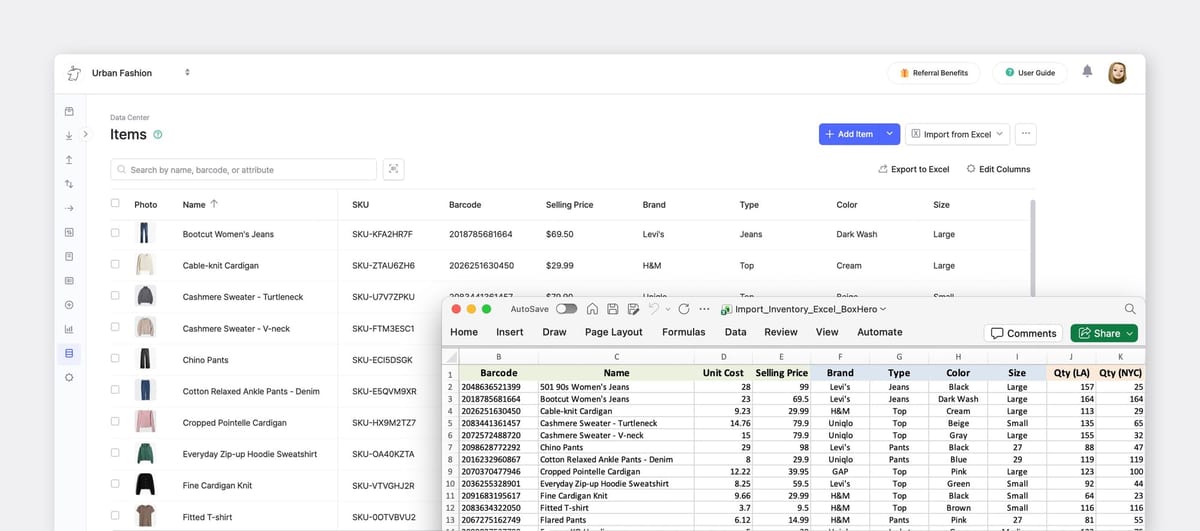
- If you're already using Excel, you can import your items directly instead of starting over.
BoxHero follows this approach and layers AI on top. Its reporting tools let you describe what you want in plain language, then generate and export results directly to Excel. Because the underlying data updates in real time from scans and orders, the AI Assistant is always working from current inventory.
Build reports with Custom Analytics by asking questions to the AI Assistant.
How to Start This Week
- Export your current stock, or open your inventory app's AI tool.
- Start with a simple report prompt to see what it can generate.
- Try a pattern check (like slow movers or stockouts) and compare it with what you already know.
- Before acting on any reorder suggestion, spot-check a few items on the shelf.
- If numbers are consistently off, fix the root cause by improving how inventory is tracked, not just how it’s analyzed.
Remember, the goal isn’t to just “use AI more.”
It’s to make better decisions with the inventory data you already have, without spending hours building and pulling reports.
If you want to try this with your own numbers, you can start with BoxHero’s free trial. It includes built-in reporting and an AI assistant that turns your inventory data into simple summaries and insights.