SKU Best Practices: Naming Rules, Common Mistakes, and Cleanup
A SKU a product code a business creates for itself.
Unlike a UPC, which is issued by GS1, or an Amazon ASIN, which is assigned by Amazon, a stock keeping unit has no global standard. You can structure a SKU however you want—any format, any length—to fit your specific items, business model, or industry.
That flexibility sounds great in theory, but in practice it can easily lead to messy SKUs, especially as your catalog grows.
This post covers how to properly structure SKU codes, the common ways SKU data gets corrupted in spreadsheets and integrations, and when it might be time to retire a slow-moving product from your catalog entirely.
UPC vs. SKU: What's the difference?
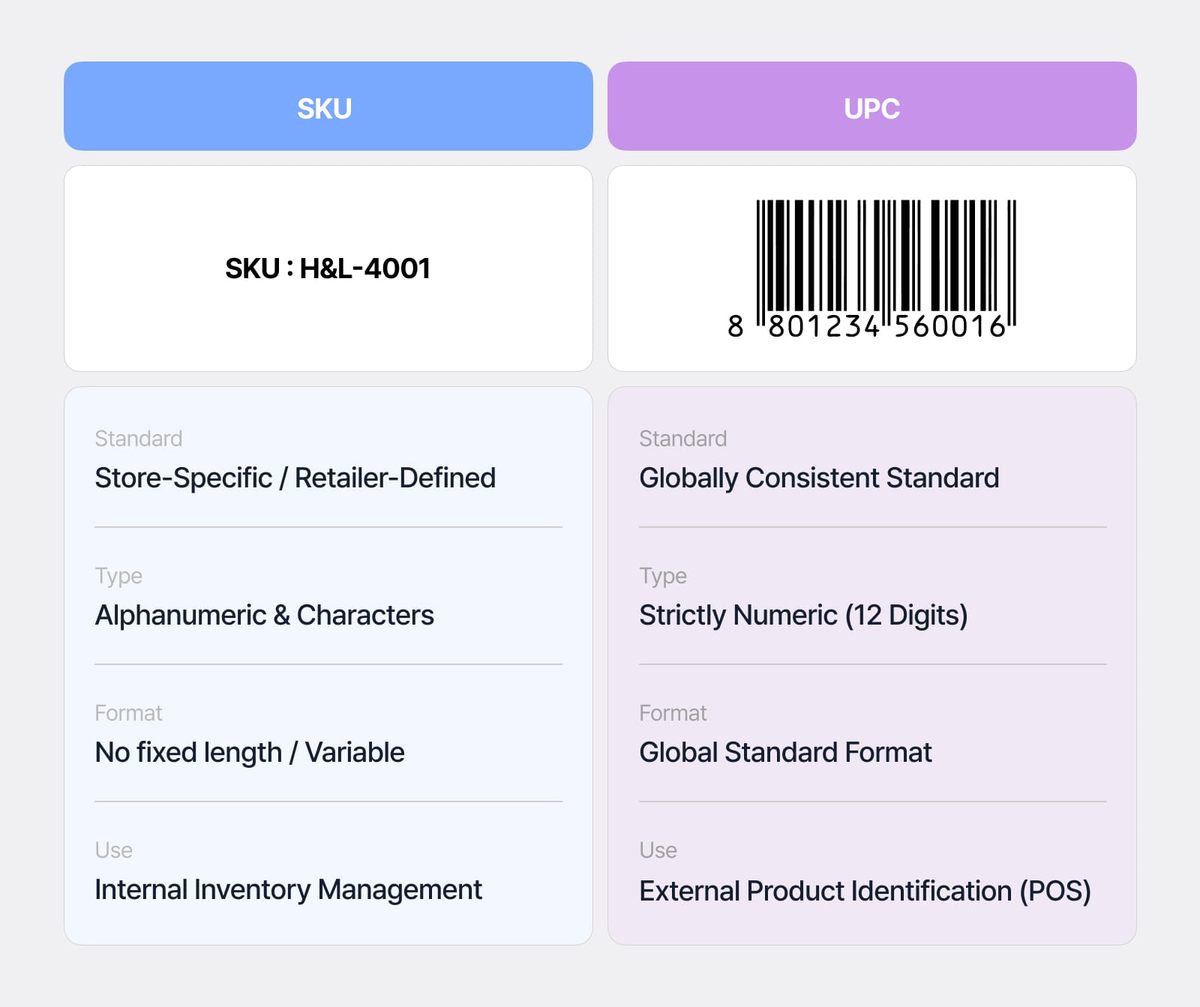
Before diving into the naming rules, let's look at how a SKU differs from a UPC. These two terms are often mentioned together, but they serve very different purposes in retail:
- Universal Product Code: A UPC is global, standardized 12-digit number issued externally by GS1, which means it stays identical no matter who is selling it. If a manufacturer ships a box of shoes to Target, Nordstrom, and an independent boutique, that shoe still has the exact same UPC everywhere.
- Stock Keeping Unit: A SKU is a unique, alphanumeric code created internally by your business. It's tailored entirely to your specific tracking needs — like color, size, or warehouse location. The exact same shoe could have a completely different SKU at Target than it does at Nordstrom.
Readable codes vs. Random codes
There are two common ways to structure SKUs.
1. Readable SKUs
Sometimes called an intelligent or meaningful SKU, a readable SKU embeds product information directly into the code. For example,TSH-BLK-M reads in three parts: product type (T-SHIRT), color (BLACK), and size (MEDIUM). You can look at it and immediately understand what it represents.
2. Random SKUs
On the other hand, random SKUs, also known as sequential codes, carry no meaning on their own. Something like 100482 only becomes useful when it's looked up in your inventory management system, which links the code to the product record.
On top of that, teams often interpret abbreviations differently, which can lead to duplicates or near-duplicates for the same item. For example, two departments setting up the same backpack variant might interpret the color "charcoal" and size "medium" differently:
BPK-CHAR-MD— used by the marketing teamBPK-CHRL-MED— used by the warehouse team
The Sweet Spot: The Hybrid Approach
Most inventory systems settle somewhere in the middle. They encode only the stable, high-level attributes that rarely change and help with recognition (like category or brand), while keeping the full attribute set in the database.
Square's guidance is to put the highest-level category at the front so staff read the start of a code at a glance, and to keep the structure identical across all items. Information that's likely to change (like price, supplier, or season) should not be included in the SKU itself.
Five naming rules for clean, consistent SKUs
A handful of formatting choices decide whether SKU data stays intact as they move between spreadsheets, barcode printers, and sales channels.
1) Start with a letter
Some spreadsheets and inventory tools drop leading zeros, so 012345 reads as 12345. In some cases, a leading zero can even read as a zero quantity. Starting with a letter avoids both.
2) Avoid lookalike characters
The letter O and the number 0, or the lowercase l and the number 1, are easy to mistype when entering data and easy to misread on printed labels.
3) Use letters and numbers only
Spaces and special characters like slashes, ampersands, and periods, can break CSV imports, barcode printing, and integrations. For example, a slash (/) may be read as a date, and an @ symbol as an email address.
4) Keep SKUs in a consistent range
Around 8 to 12 characters works well in most cases. That's long enough to stay unique and leaves room for new product lines, but short enough to scan and fit on a label (Amazon's product ASIN is ten characters, for reference).
5) One SKU, one variant
One stock keeping unit should always represent one product variant. If two items share a SKU, their stock will merge, which can hide stockouts and create reporting issues.
Avoid anything that can change over time, like price, promotions, season, or supplier details. Don’t use vendor SKUs as your own internal codes, and never reuse old SKUs for new products — each one should stay tied to a single item and its history.
When to remove a product from your catalog
Adding a product is never just “adding a SKU.” Each new SKU adds work: something to track, forecast, store, and count.
A practical way to review SKUs is to look at two things: sales volume over time and margin contribution (price minus cost, multiplied by units sold). Items that score low on both become candidates for removal.
But low sales alone isn’t enough reason to cut something. Some products move slowly but still play an important role — supporting a product line, serving a niche customer group, or completing a set. Before removing anything, understand what role it plays in your catalog.
To prevent SKU counts from climbing back, you can follow a simple rule:
"One in, one out."

Inventory errors are expensive. According to IHL Group, the global cost of out-of-stocks and overstocks reached $1.73 trillion in 2025, with out-of-stocks alone accounting for nearly $1.2 trillion. IHL president Greg Buzek called the gap between data-led and traditional inventory management "an existential issue" for retailers.
A smaller, well-managed SKU set is easier to track accurately — and that's exactly what prevents both empty shelves and dead stock.
How AI is changing SKU management
In 2026, AI inventory tools are increasingly used to by brands to analyze SKU performance, flag slow-moving items, and answer catalog questions in plain language.
Ask something like "show me underperforming items by SKU" and get back a ranked, exportable list (no SQL or formulas required). It becomes a lot easier to identify products that fall below your sales or margin thresholds.
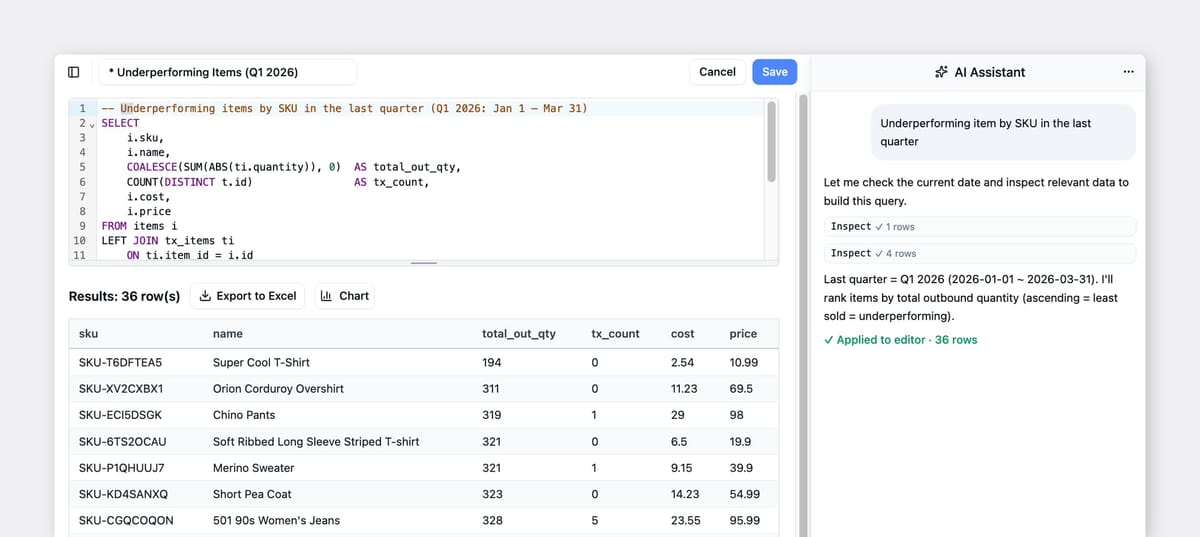
These tools rely on one thing: clean, consistent SKU data. A unified code structure is the baseline requirement before any algorithm can return useful answers. If the underlying SKU codes and product structure are messy, even the most advanced AI produce unreliable results.
"Garbage in, garbage out."
That’s why getting the basics of your catalog structure right is more important than the fancy AI tools you use. You can’t automate a system that isn't organized first.
Managing SKUs in BoxHero
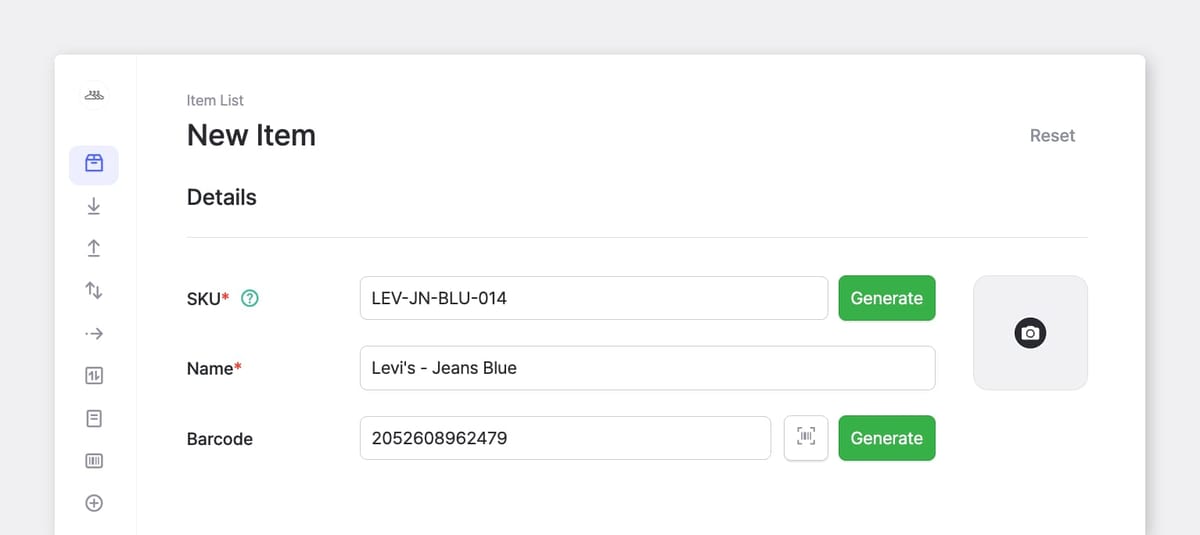
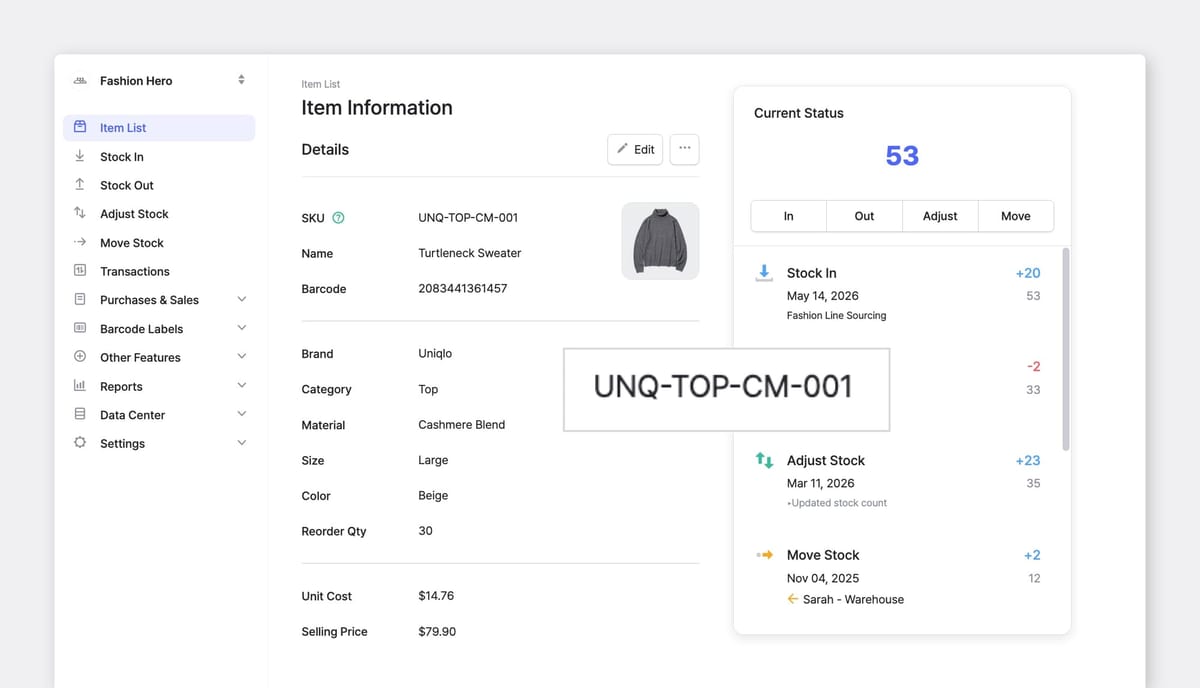
If you want clean, AI-ready inventory data, BoxHero stores a SKU field on every item. You can enter your own code or let the system generate one automatically, and SKUs can also be added or updated in bulk through Excel upload.
Each item record holds the SKU, barcode, cost, price, and stock by location together, so your inventory stays organized as your catalog grows.
Ready to put a better SKU system in place? Start managing your inventory with BoxHero. Try all features free for 30 days — no credit card required.
RELATED POSTS
 Nahi Kim
 Ahrom Yoo
 Heehong Moon