> For the complete documentation index, see [llms.txt](https://www.boxhero.io/docs/llms.txt). Markdown versions of documentation pages are available by appending `.md` to page URLs; this page is available as [Markdown](https://www.boxhero.io/docs/documentation/ko/key-features/purchase-and-sales/sales-reports.md).

# 매출 분석

***

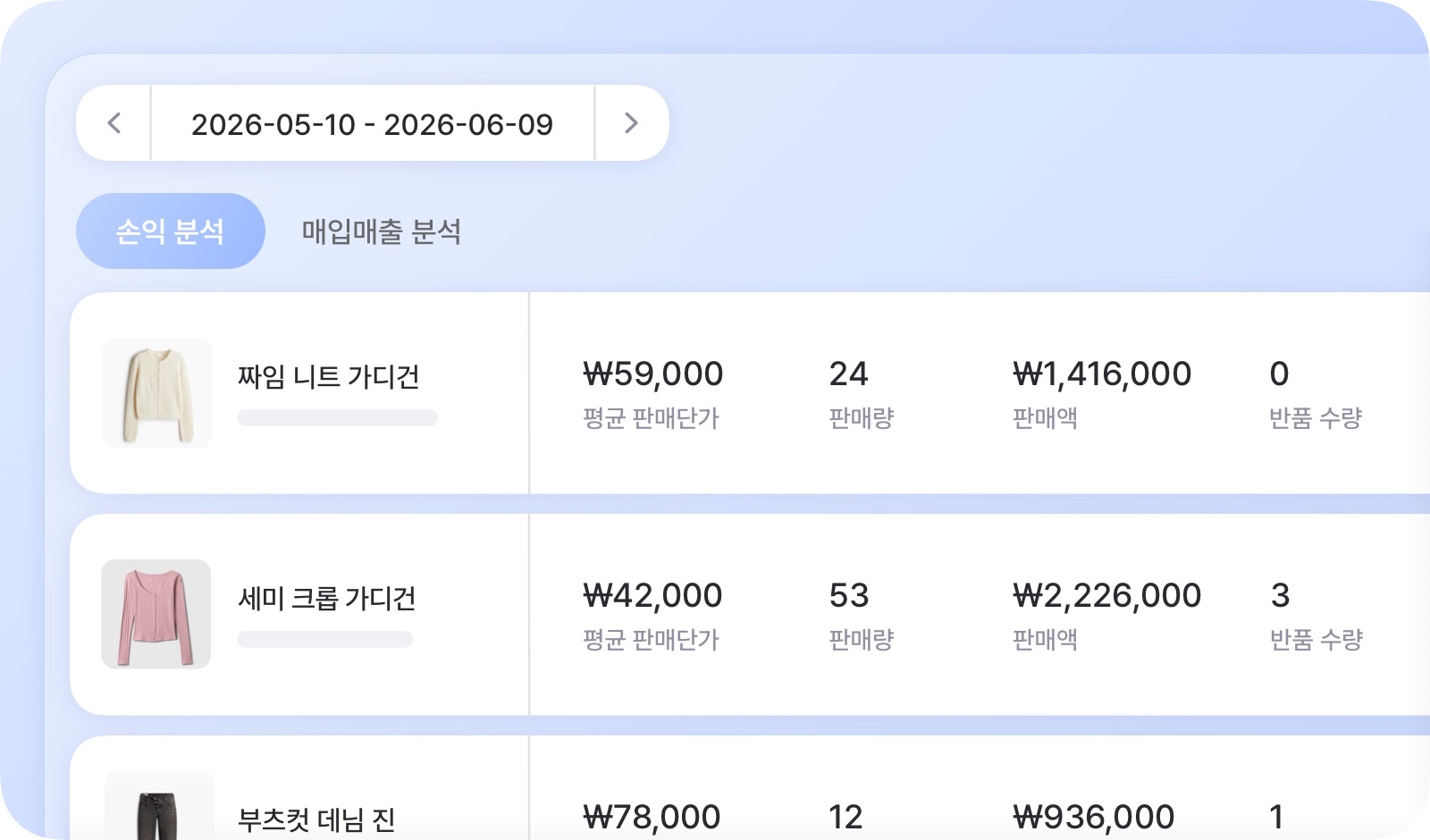
<figure><img src="/files/ig7NBgOgrRSunyjsRuPu" alt="매출 분석 대표 이미지"><figcaption></figcaption></figure>

***

## **손익 분석** <a href="#profit-and-loss-analysis" id="profit-and-loss-analysis"></a>

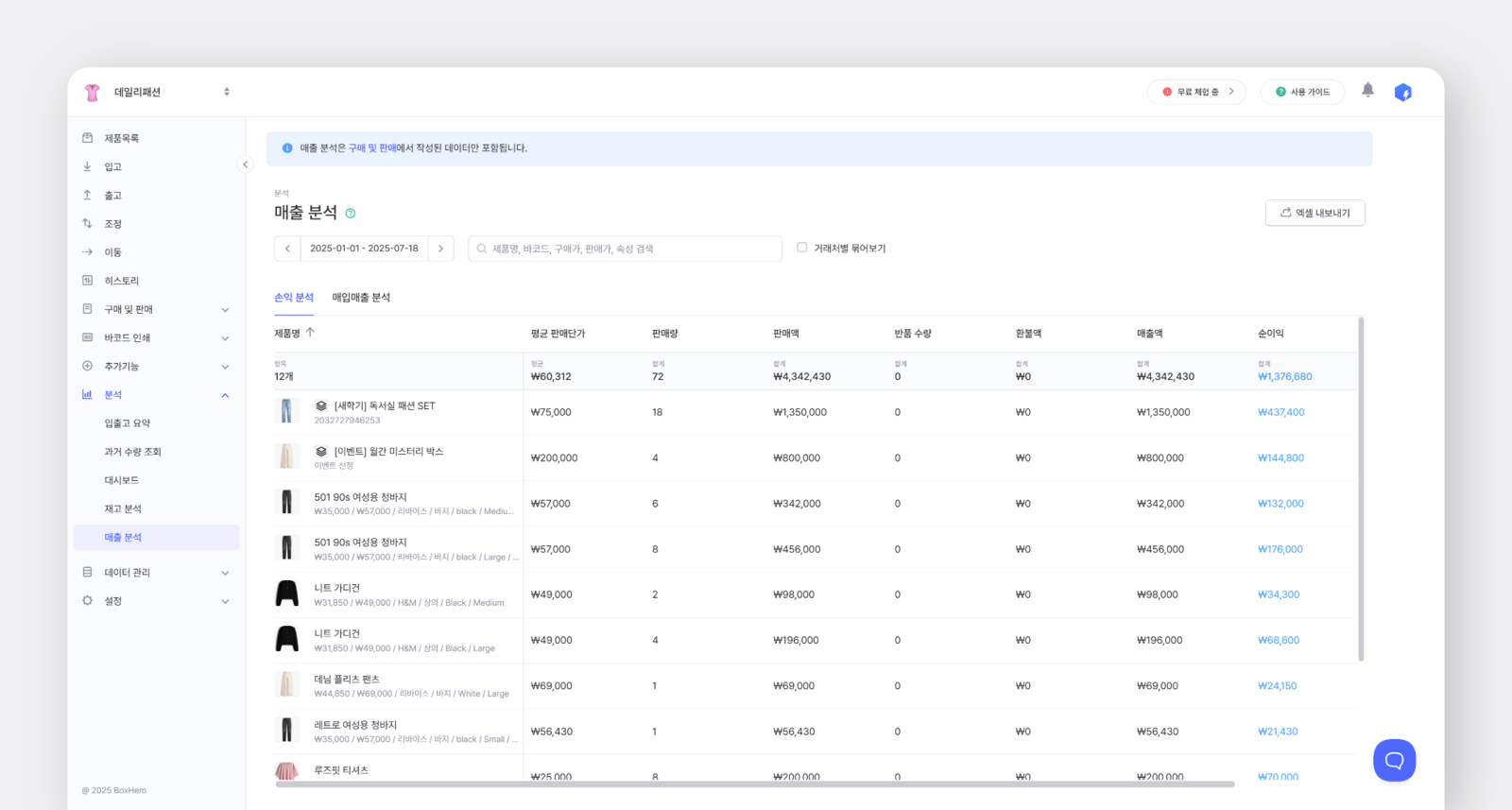
**작성된 '판매서'를 기준으로 손익이 계산됩니다.**&#x20;

`구매` 기능을 사용하지 않고 `판매`만 사용할 경우, 이 탭에서 결과를 확인할 수 있습니다.

<figure><img src="/files/QMydWwcqjv66QPHQprjX" alt="손익 분석 화면"><figcaption></figcaption></figure>

<table data-header-hidden><thead><tr><th width="183.285888671875"></th><th></th></tr></thead><tbody><tr><td><strong>평균 판매단가</strong></td><td>판매액 ÷ 판매량</td></tr><tr><td><strong>판매량</strong></td><td>판매된 제품의 총 수량</td></tr><tr><td><strong>판매액</strong></td><td>판매량 x 판매단가<br>* 판매단가 = 판매서에 기재된 가격</td></tr><tr><td><strong>반품 수량</strong></td><td>반품으로 재입고된 수량</td></tr><tr><td><strong>환불액</strong></td><td>반품 수량 x 환불단가<br>* 환불단가 = 반품서에 기재된 가격</td></tr><tr><td><strong>매출액</strong></td><td>판매액 - 환불액</td></tr><tr><td><strong>순이익</strong></td><td>매출액 - (<mark style="color:$primary;">구매가</mark> x (판매량 - 반품수량))<br>* <mark style="color:$primary;">구매가 = 제품 정보에 등록된 구매가</mark></td></tr><tr><td><strong>이익률</strong></td><td>순이익 ÷ 매출액</td></tr></tbody></table>

{% hint style="warning" %}
**유의사항**

* 판매액은 **할인/세금이 반영된 값으로 표기**됩니다.
* 제품 정보에서 **구매가를 수정**하면, 변경된 금액을 기준으로 **순이익이 다시 계산**됩니다.
* **선택한 기간 중 판매 이력이 있는 제품**들만 표시됩니다.
* **반품 수량은 반품 처리일 기준**으로 손익에 반영됩니다.
  {% endhint %}

{% hint style="success" %}
검색창 옆 **‘거래처별 묶어보기’**&#xC5D0; 체크하면, 선택한 기간 동안의 **거래처별 매출을 확인**할 수 있습니다.
{% endhint %}

## **매입매출 분석** <a href="#purchase-and-sales-analysis" id="purchase-and-sales-analysis"></a>

**작성된** **'발주서'와 '판매서'를 기준으로 매입매출이 반영됩니다.**&#x20;

`구매`, `판매` 기능을 모두 사용할 경우, 매입매출 탭에서 결과를 확인할 수 있습니다.
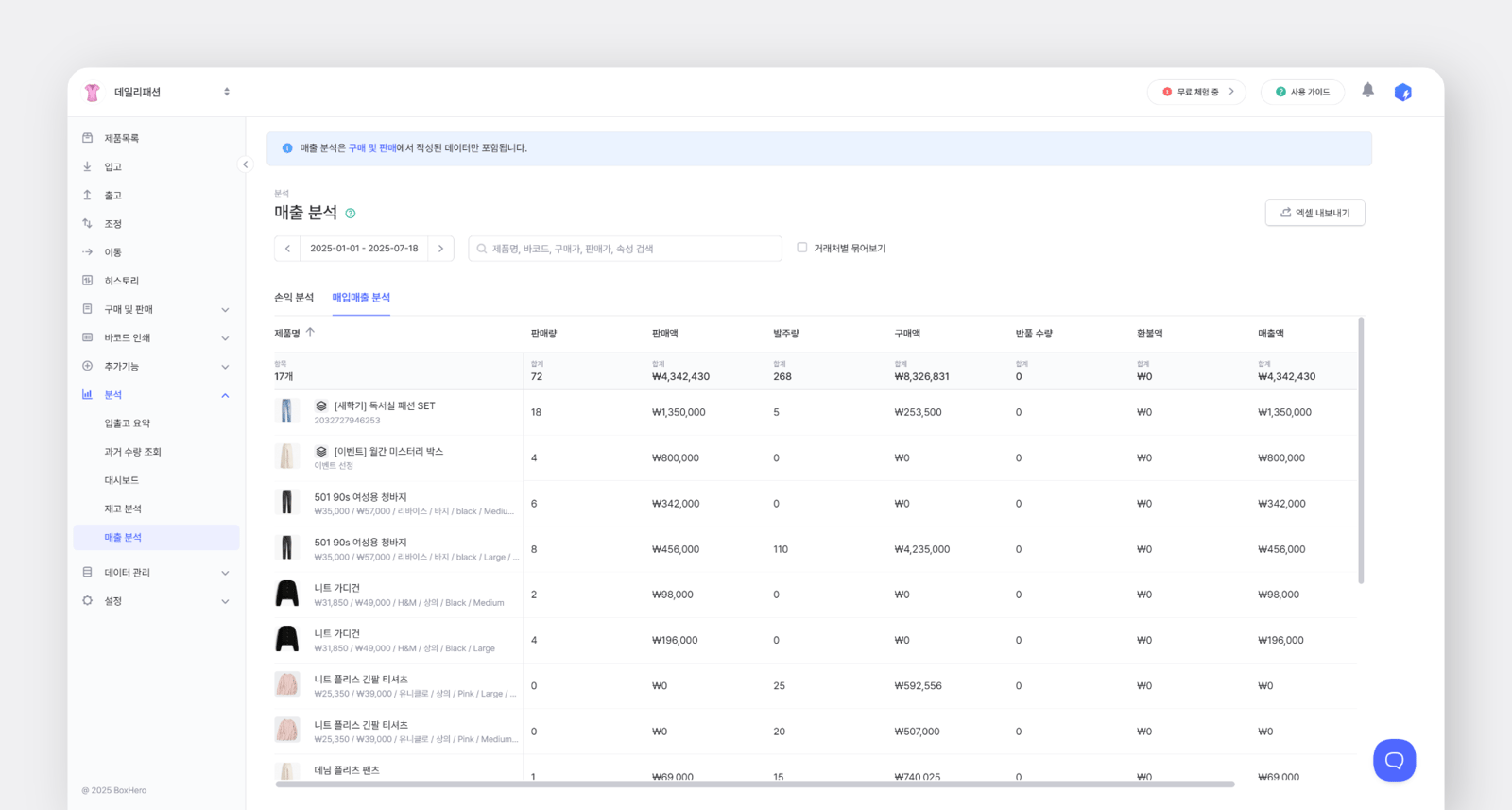
<figure><img src="/files/9u2w0t9rbGUjjCFgAM5v" alt="매입매출 화면"><figcaption></figcaption></figure>

<table data-header-hidden><thead><tr><th width="181.7618408203125"></th><th></th></tr></thead><tbody><tr><td><strong>판매량</strong></td><td>판매된 제품의 총 수량</td></tr><tr><td><strong>판매액</strong></td><td>판매량 x 판매단가<br>* 판매단가 = 판매서에 기재된 가격</td></tr><tr><td><strong>발주량</strong></td><td>구매된 제품의 총 수량</td></tr><tr><td><strong>구매액</strong></td><td>발주량 x 구매단가<br>* 구매단가 = 발주서에 기재된 가격</td></tr><tr><td><strong>반품 수량</strong></td><td>반품으로 재입고된 수량</td></tr><tr><td><strong>환불액</strong></td><td>반품 수량 x 환불단가<br>* 환불단가 = 반품서에 기재된 가격</td></tr><tr><td><strong>매출액</strong></td><td>판매액 - 환불액</td></tr><tr><td><strong>차익</strong></td><td>매출액 - 구매액</td></tr></tbody></table>

{% hint style="warning" %}
**유의사항**

* 판매액, 구매액은 **할인/세금이 반영된 값으로 표기**됩니다.
* **선택한 기간 중 판매 또는 구매 이력이 있는 제품**들만 표시됩니다.
* **반품 수량은 반품 처리일 기준**으로 매입매출에 반영됩니다.
  {% endhint %}

{% hint style="success" %}
검색창 옆 **‘거래처별 묶어보기’**&#xC5D0; 체크하면, 선택한 기간 동안의 **거래처별 매출을 확인**할 수 있습니다.
{% endhint %}

## 통화 및 환율 적용

`매출 분석`의 금액은 팀에 설정된 [**기본 통화**](/docs/documentation/ko/settings/team.md#display-settings)를 기준으로 표시됩니다. 발주서/판매서에서 사용한 통화가 기본 통화와 다른 경우, **현재 환율이 적용되어 자동으로 변환됩**니다.&#x20;

예를 들어 기본 통화가 KRW인 경우, USD로 작성된 판매서는 현재 환율 기준으로 KRW로 환산되어 표시됩니다.
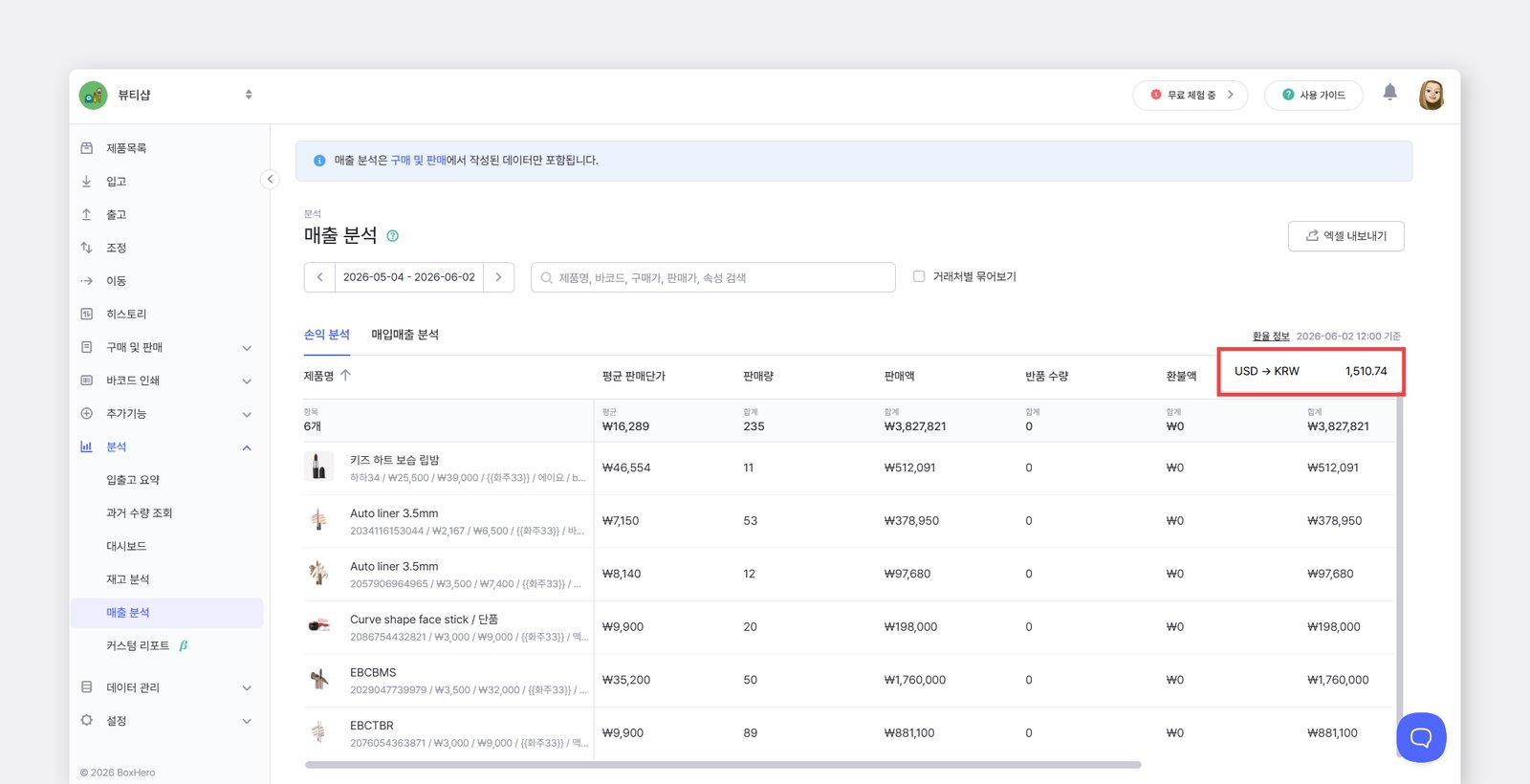
<figure><img src="/files/5E1vgdxXQTaumfl868pj" alt="매출분석에서 환율정보가 표시되는 위치"><figcaption></figcaption></figure>

***