Barcoding
Scan items to receive, move, and adjust stock in real time. Design custom labels in a drag-and-drop editor and print them on any printer you own. Phone, tablet, or desktop — your inventory stays in sync with every scan.
Start today with a 30-day trial.
Barcoding
Scan items to receive, move, and adjust stock in real time. Design custom labels in a drag-and-drop editor and print them on any printer you own. Phone, tablet, or desktop — your inventory stays in sync with every scan.
Start today with a 30-day trial.
Barcoding
Scan items to receive, move, and adjust stock in real time. Design custom labels in a drag-and-drop editor and print them on any printer you own. Phone, tablet, or desktop — your inventory stays in sync with every scan.
Start today with a 30-day trial.

Any device, any printer — full design freedom, no setup.
Any device, any printer — full design freedom, no setup.
Any device, any printer — full design freedom, no setup.
Scan Barcodes
Receive shipments, transfer items between locations, and adjust quantities with a single scan. Every scan updates inventory in real time across desktop and mobile.
Adjust Stock
Scan item barcodes to verify quantities, spot discrepancies, and make adjustments on the spot. Works on desktop and mobile.

Adjust Stock
Scan item barcodes to verify quantities, spot discrepancies, and make adjustments on the spot. Works on desktop and mobile.
Adjust Stock
Scan item barcodes to verify quantities, spot discrepancies, and make adjustments on the spot. Works on desktop and mobile.
Move Stock
Transfer items between locations with a scan. You can track item movement across warehouses, stores, and storage sites without manual updates.

Move Stock
Transfer items between locations with a scan. You can track item movement across warehouses, stores, and storage sites without manual updates.
Move Stock
Transfer items between locations with a scan. You can track item movement across warehouses, stores, and storage sites without manual updates.
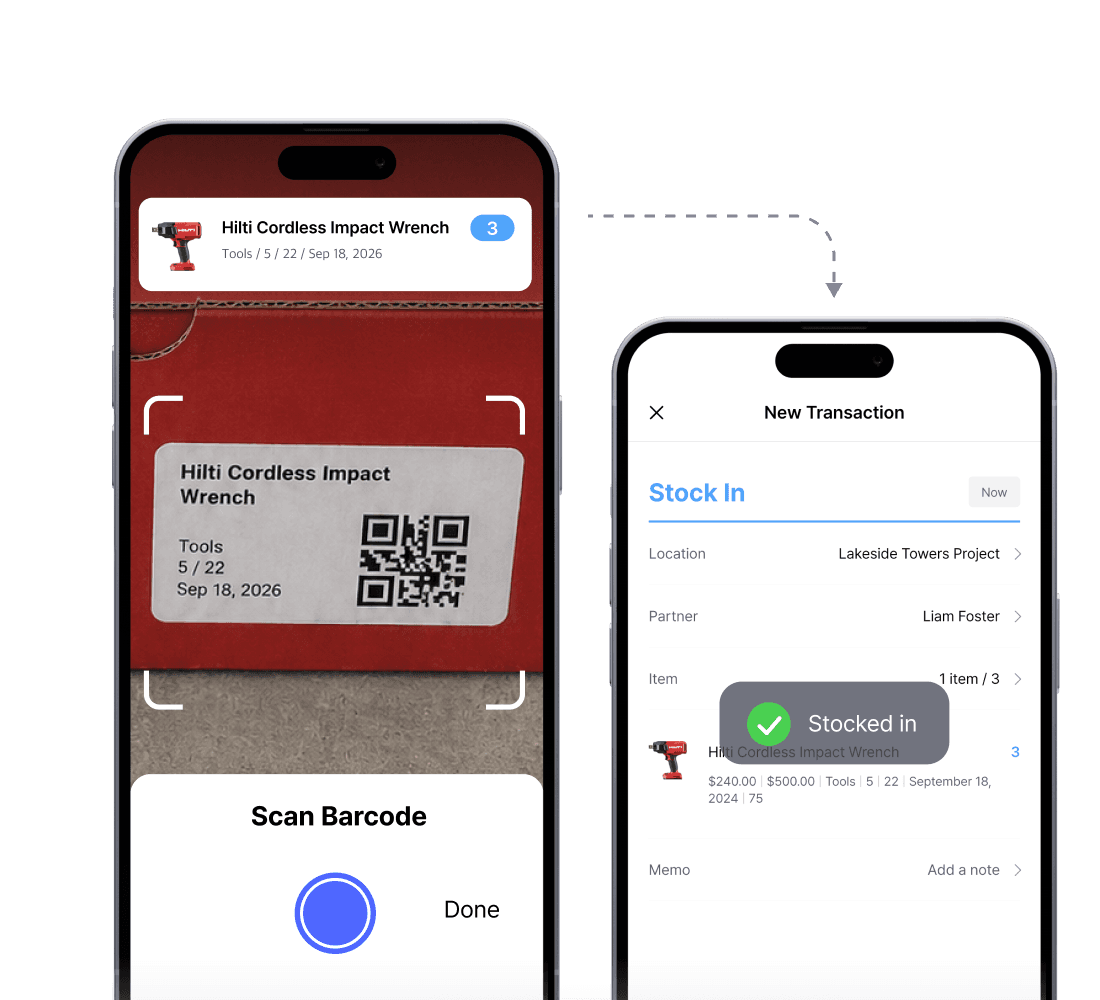
Stock In & Out
Track incoming and outgoing inventory with a single scan. Receive new shipments, fulfill orders, and update stock without typing a thing.
Stock In & Out
Track incoming and outgoing inventory with a single scan. Receive new shipments, fulfill orders, and update stock without typing a thing.
Stock In & Out
Track incoming and outgoing inventory with a single scan. Receive new shipments, fulfill orders, and update stock without typing a thing.
Print Barcodes
Print barcode labels directly from BoxHero on any printer. The desktop app handles driver setup, label sizing, and print quality for sharp, scannable barcodes.
Plug-and-Print Setup
Skip the driver installation and paper size configuration. BoxHero auto-detects your label size and optimizes print quality for sharp, scannable barcodes.

Plug-and-Print Setup
Skip the driver installation and paper size configuration. BoxHero auto-detects your label size and optimizes print quality for sharp, scannable barcodes.
Plug-and-Print Setup
Skip the driver installation and paper size configuration. BoxHero auto-detects your label size and optimizes print quality for sharp, scannable barcodes.
Mobile Printing
Print barcode labels directly from your phone over Bluetooth, Wi-Fi, or LAN. Update inventory and print labels on the spot, wherever you’re working.

Mobile Printing
Print barcode labels directly from your phone over Bluetooth, Wi-Fi, or LAN. Update inventory and print labels on the spot, wherever you’re working.
Mobile Printing
Print barcode labels directly from your phone over Bluetooth, Wi-Fi, or LAN. Update inventory and print labels on the spot, wherever you’re working.
Printer Compatibility
No specialized equipment required. BoxHero supports standard office printers with label sheets (Avery, Formtec, Printec) and thermal label printers from Zebra, Bixolon, and more.

Printer Compatibility
No specialized equipment required. BoxHero supports standard office printers with label sheets (Avery, Formtec, Printec) and thermal label printers from Zebra, Bixolon, and more.
Printer Compatibility
No specialized equipment required. BoxHero supports standard office printers with label sheets (Avery, Formtec, Printec) and thermal label printers from Zebra, Bixolon, and more.
Customize Labels
Design barcode labels exactly how you want them. Build from scratch using our custom label designer, with full control over every element.
Full Design Freedom
Place text, barcodes, QR codes, logos, and shapes anywhere on the canvas with our drag-and-drop label designer. Rotate, resize, and reposition as needed.

Full Design Freedom
Place text, barcodes, QR codes, logos, and shapes anywhere on the canvas with our drag-and-drop label designer. Rotate, resize, and reposition as needed.
Full Design Freedom
Place text, barcodes, QR codes, logos, and shapes anywhere on the canvas with our drag-and-drop label designer. Rotate, resize, and reposition as needed.
Brand-Ready Labels
Upload your company logo or any image to keep labels on-brand. Insert rectangles, dividers, and shapes to organize your design.

Brand-Ready Labels
Upload your company logo or any image to keep labels on-brand. Insert rectangles, dividers, and shapes to organize your design.
Brand-Ready Labels
Upload your company logo or any image to keep labels on-brand. Insert rectangles, dividers, and shapes to organize your design.
Live Inventory Data
Use variable fields to auto-populate label content from your inventory: item name, SKU, price, and any custom attributes you track. Drop in a variable once to pull the right data automatically.

Live Inventory Data
Use variable fields to auto-populate label content from your inventory: item name, SKU, price, and any custom attributes you track. Drop in a variable once to pull the right data automatically.
Live Inventory Data
Use variable fields to auto-populate label content from your inventory: item name, SKU, price, and any custom attributes you track. Drop in a variable once to pull the right data automatically.
FAQ
FAQ
Which barcode scanner should I use?
What kind of barcode printer should I use?
I'm having trouble printing my barcodes.
Can I add my brand logo to the barcode labels?
Check out other related features

Stock Count
Run full or partial counts with your team, splitting the work into task sheets by area or shelf. Review every difference against recorded quantities, then apply the results in a single step.

Multiple Locations
Manage inventory across warehouses, stores, and stockrooms, all from one place. See how much you have at each site, and move stock between locations with full tracking history.
Excel Import & Export
Add and update items straight from a spreadsheet, from prices and quantities to SKUs. Download a template that matches your columns, then export back to Excel whenever you need.
Check out other related features
Stock Count
Run full or partial counts with your team, splitting the work into task sheets by area or shelf. Review every difference against recorded quantities, then apply the results in a single step.
Multiple Locations
Manage inventory across warehouses, stores, and stockrooms, all from one place. See how much you have at each site, and move stock between locations with full tracking history.
Excel Import & Export
Add and update items straight from a spreadsheet, from prices and quantities to SKUs. Download a template that matches your columns, then export back to Excel whenever you need.
Check out other related features
Stock Count
Run full or partial counts with your team, splitting the work into task sheets by area or shelf. Review every difference against recorded quantities, then apply the results in a single step.
Multiple Locations
Manage inventory across warehouses, stores, and stockrooms, all from one place. See how much you have at each site, and move stock between locations with full tracking history.
Excel Import & Export
Add and update items straight from a spreadsheet, from prices and quantities to SKUs. Download a template that matches your columns, then export back to Excel whenever you need.
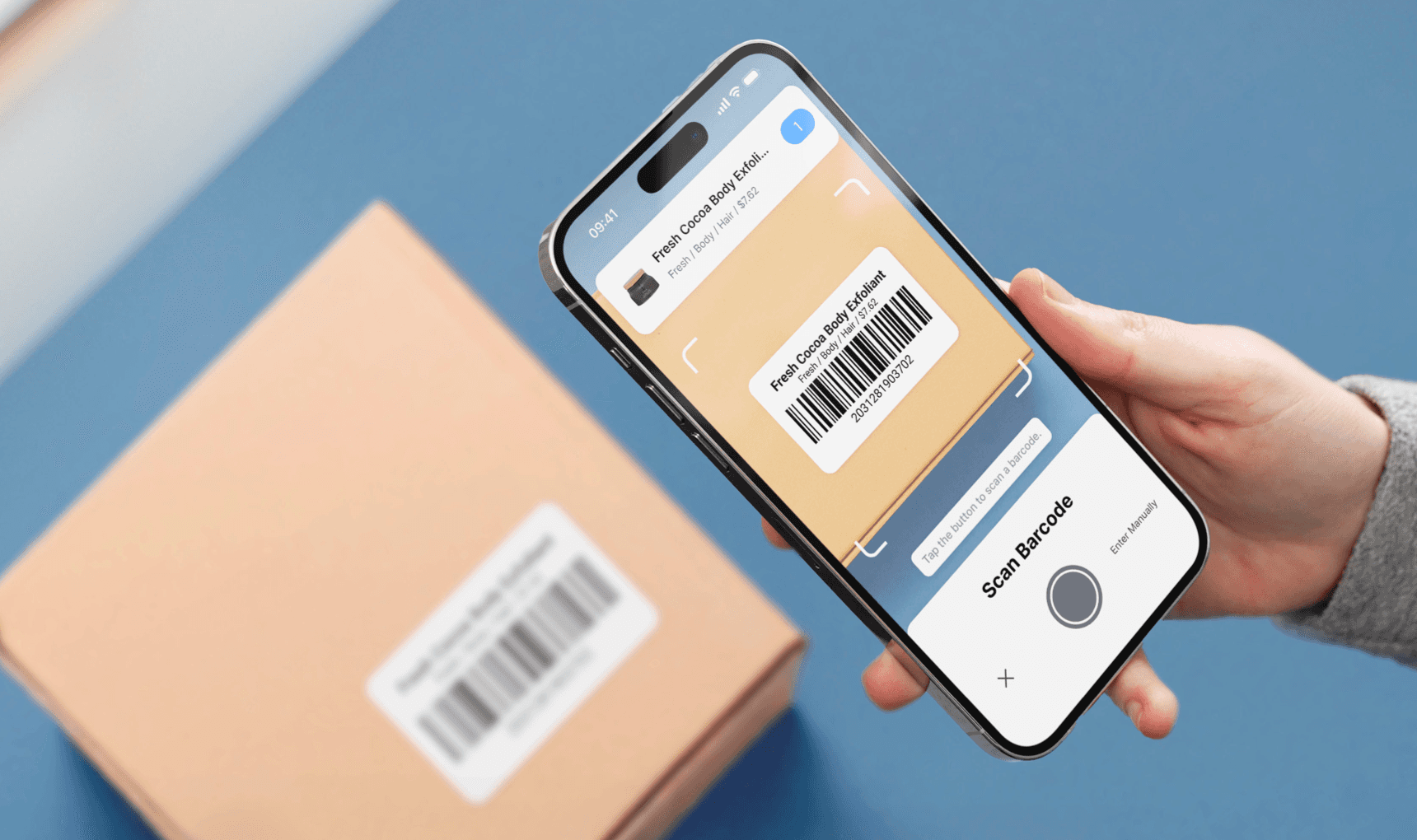
Built-in barcode label design and printing
With BoxHero, you can scan barcodes with your phone or external scanner, design custom templates, and print clear labels on any printer you own.
Built-in barcode label design and printing
With BoxHero, you can scan barcodes with your phone or external scanner, design custom templates, and print clear labels on any printer you own.
Built-in barcode label design and printing
With BoxHero, you can scan barcodes with your phone or external scanner, design custom templates, and print clear labels on any printer you own.
Make the most out of barcodes
Get tips and updates on connecting barcode scanners and printers with BoxHero.
Make the most out of barcodes
Get tips and updates on connecting barcode scanners and printers with BoxHero.
Make the most out of barcodes
Get tips and updates on connecting barcode scanners and printers with BoxHero.
Ready to integrate barcodes into your workflow?
Try BoxHero for free for 30 days.
Ready to integrate barcodes into your workflow?
Try BoxHero for free for 30 days.
Ready to integrate barcodes into your workflow?
Try BoxHero for free for 30 days.

Scan barcodes on the go
Our mobile app makes it easy to control your inventory from anywhere—even when you’re offline. Use BoxHero on your phone, desktop, or tablet for automatic syncing.


Scan barcodes on the go
Our mobile app makes it easy to control your inventory from anywhere—even when you’re offline. Use BoxHero on your phone, desktop, or tablet for automatic syncing.
Scan barcodes on the go
Our mobile app makes it easy to control your inventory from anywhere—even when you’re offline. Use BoxHero on your phone, desktop, or tablet for automatic syncing.
Quick reference


Quick reference
Quick reference
Features
Use Cases
© 2026 BoxHero, Inc.
Features
Use Cases
© 2026 BoxHero, Inc.
Features
Use Cases
© 2026 BoxHero, Inc.